JavaScript SEO sits at the intersection of two disciplines that each get half the picture wrong in isolation. Frontend developers underestimate how differently Googlebot's rendering pipeline behaves from a real browser. SEOs overestimate how much JavaScript execution hurts rankings — the problem is subtler: it's about rendering timing, resource prioritization, and the specific content that Google indexes from the rendered DOM vs the raw HTML. This article explains exactly how Google processes JavaScript-rendered content in 2026, what the practical SEO implications are, and how to audit and fix rendering gaps in production.
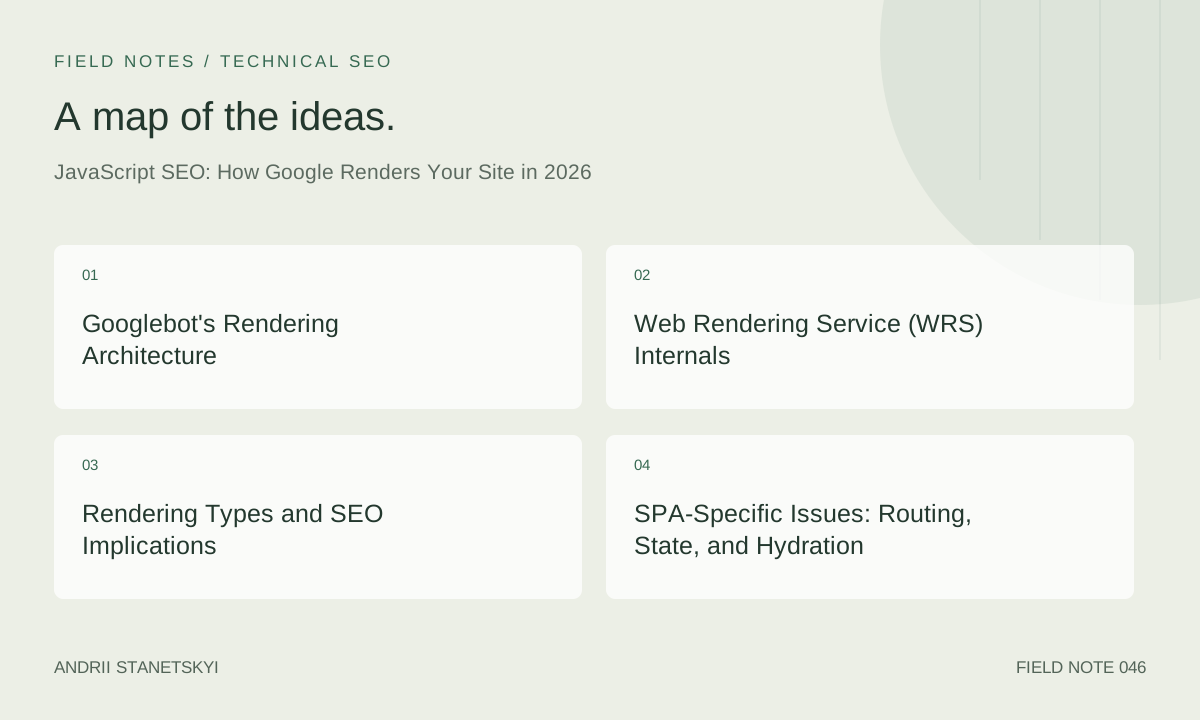
Googlebot's Rendering Architecture
Google operates a two-stage indexing pipeline for web content. In the first stage, the crawler fetches raw HTML and extracts immediately available content, links, and signals. This is fast and happens at crawl time. In the second stage, pages are sent to the Web Rendering Service (WRS) for full JavaScript execution and DOM rendering. This is slower and happens in a rendering queue that can be delayed by hours to days depending on site priority, crawl budget, and rendering queue depth.
The practical consequence: content that requires JavaScript execution to appear in the DOM may not be indexed as quickly, and may not be indexed at all if the rendering fails or times out. Google has confirmed this two-stage delay exists and recommends that SEO-critical content be available in the initial HTML response.
Googlebot's Browser Engine
WRS runs on a version of Chrome that Google updates regularly — as of 2026, Googlebot's Chrome version is tracked publicly via Google's user-agent changelog. Historically, WRS has lagged behind the current stable Chrome release by 1–3 years, but Google has accelerated this. In 2026, Googlebot runs Chrome 120+ and supports modern JavaScript features including ES2022 syntax, async/await, dynamic imports, and CSS features like container queries.
What WRS does NOT fully emulate:
- Real network conditions — it fetches resources from the Google crawler network, not through the public internet
- User interactions — it cannot click, scroll, or interact with the page
- Persistent state — no cookies, no localStorage, no IndexedDB across renders
- IntersectionObserver triggering on scroll — elements below the fold may not trigger lazy load
Web Rendering Service (WRS) Internals
WRS renders pages in a headless Chrome environment. The rendering budget per page is limited — Google hasn't published the exact resource timeout, but behavioral evidence suggests pages that take more than 5–7 seconds to render their critical content risk incomplete indexing. Very JavaScript-heavy SPAs that require multiple data fetch cycles before rendering meaningful content are at highest risk.
The Evergreen Googlebot Question
Google claims Googlebot is "evergreen" — updated with Chrome. However, the rendering infrastructure has historically been slower to update than stated. A pragmatic posture: assume Googlebot supports ES2020+ syntax natively but test specific modern APIs (like Scheduler API, Navigation API) against Google's confirmed Chrome version before relying on them in SEO-critical rendering code.
Resource Loading in WRS
// Check if running in Googlebot/headless environment
// Use this to serve simplified content in rendering environments
const isBot = /Googlebot|bingbot|Slurp|DuckDuckBot/i.test(navigator.userAgent);

// Better: server-side detection
// User-Agent: Mozilla/5.0 (Linux; Android 6.0.1; Nexus 5X Build/MMB29P)
//   AppleWebKit/537.36 (KHTML, like Gecko)
//   Chrome/120.0.6099.0 Mobile Safari/537.36
//   (compatible; Googlebot/2.1; +http://www.google.com/bot.html)
Rendering Types and SEO Implications
| Rendering Type | Content in Initial HTML | JS Required for Indexing | SEO Risk | CWV Impact |
|---|---|---|---|---|
| Server-Side Rendering (SSR) | Full content | No | Minimal | High TTFB risk |
| Static Site Generation (SSG) | Full content | No | None | Excellent (pre-built) |
| Incremental Static Regeneration (ISR) | Full content | No | Minimal (stale risk) | Excellent |
| Client-Side Rendering (CSR) | Empty shell only | Yes (full JS required) | High | Poor (LCP delayed) |
| Hybrid (SSR shell + CSR data) | Partial | Partial | Medium | Medium |
| Dynamic Rendering | Full (bot-specific) | No (for bots) | Cloaking risk | N/A (bot path) |
Dynamic rendering (serving pre-rendered HTML to bots, full client-side app to users) was a common workaround that Google officially supported but has repeatedly flagged as a cloaking risk if not implemented carefully. In 2026, the recommended approach is SSR or SSG — dynamic rendering is a technical debt that becomes harder to maintain as the site grows.
SPA-Specific Issues: Routing, State, and Hydration
Client-Side Routing and Googlebot
SPAs that use the History API for client-side routing have historically been problematic for Google. Googlebot does not click links — it processes the initial render and extracts links from the rendered DOM. For SPA routes to be indexed, each route must be accessible as a direct URL that the server responds to with meaningful HTML.
// Next.js App Router: each page is a separate server component
// Each URL responds with full HTML — no client-side routing dependency for Googlebot
// /app/products/[id]/page.tsx

export async function generateStaticParams() {
  // Pre-generate all product pages at build time
  const products = await getAllProductIds();
  return products.map(p => ({ id: p.id.toString() }));
}

export default async function ProductPage({ params }) {
  const product = await getProduct(params.id);
  return <ProductDetail product={product} />;
}
Hydration Errors and Missing Content
React hydration mismatches — where the server-rendered HTML differs from what the client renders — cause React to throw away the server HTML and re-render from scratch. During this re-render period, content may briefly disappear from the DOM, potentially causing Googlebot to index an incomplete version if it renders at that moment.
// Common hydration mismatch: Date() produces different values server vs client
// Wrong:
function Footer() {
  return <p>© {new Date().getFullYear()}</p>;
}

// Correct: suppress hydration warning for known-dynamic content
function Footer() {
  return <p suppressHydrationWarning>© {new Date().getFullYear()}</p>;
}

// Better: set the year at build/render time, not runtime
// app/layout.tsx (Server Component)
export default function Layout({ children }) {
  const year = new Date().getFullYear();
  return <html><body>{children}<footer>© {year}</footer></body></html>;
}
What Content Must Be in the Initial HTML
The practical rule: any content that you want Google to index should be present in the server-sent HTML response. This includes:
- Page title and meta description (in
<head>) - H1 and primary heading hierarchy
- Body text and article content
- Internal links for crawl discovery
- Structured data (JSON-LD or microdata)
- Image
srcandaltattributes (not JS-injected) - Canonical and hreflang tags
Content that can safely be client-rendered without SEO risk:
- UI state (open/closed accordions, tab selection)
- Personalized content (logged-in user name, cart count)
- Comments and user-generated content (typically low SEO value)
- Real-time data (live prices, stock availability)
- Interactive features (maps, date pickers, chat)
Structured Data and JS Rendering
JSON-LD structured data injected via JavaScript is supported by Google — WRS executes JavaScript and reads the resulting DOM, including dynamically injected <script type="application/ld+json"> blocks. However, because of the two-stage indexing delay, structured data in the raw HTML is indexed faster and more reliably.
// Risky: JSON-LD injected after JS execution (indexing delay)
useEffect(() => {
  const script = document.createElement('script');
  script.type = 'application/ld+json';
  script.textContent = JSON.stringify(productSchema);
  document.head.appendChild(script);
}, [product]);

// Correct: JSON-LD in the server-rendered HTML
// Next.js Server Component:
export default async function ProductPage({ params }) {
  const product = await getProduct(params.id);
  const schema = {
    '@context': 'https://schema.org',
    '@type': 'Product',
    name: product.name,
    description: product.description,
    // ...
  };
  return (
    <>
      <script
        type="application/ld+json"
        dangerouslySetInnerHTML={{ __html: JSON.stringify(schema) }}
      />
      <ProductDetail product={product} />
    </>
  );
}
Auditing JS Rendering with DevTools and GSC
Google Search Console URL Inspection
GSC's URL Inspection tool shows the rendered HTML that Googlebot sees. This is the most direct way to verify what content Google has indexed from a specific URL. Use it to check that:
- Your main content is visible in the "Rendered HTML" tab
- Your canonical URL is correct in the rendered DOM
- Links in the rendered HTML match the links in your sitemap
- Structured data appears in the "Structured Data" tab
Local Rendering Comparison
// Quick diff: raw HTML vs rendered DOM
// Run in browser console on your page

const rawFetch = await fetch(window.location.href);
const rawHtml = await rawFetch.text();
const parser = new DOMParser();
const rawDoc = parser.parseFromString(rawHtml, 'text/html');

// Compare raw vs rendered
const rawLinks = rawDoc.querySelectorAll('a[href]').length;
const renderedLinks = document.querySelectorAll('a[href]').length;

console.log(Raw HTML links: ${rawLinks});
console.log(Rendered DOM links: ${renderedLinks});
console.log(JS-added links: ${renderedLinks - rawLinks});

// Links only in JS = links Googlebot may not see on first crawl
Lighthouse SEO Audits
// Lighthouse CLI: check for JS-dependent SEO issues
npx lighthouse https://example.com/products/widget \
  --only-categories=seo \
  --output=json \
  --output-path=./seo-audit.json

// Key audits to check:
// "document-title" — title visible without JS?
// "meta-description" — meta desc in initial HTML?
// "link-text" — link text meaningful in rendered HTML?
// "crawlable-anchors" — links have valid hrefs?
// "is-crawlable" — no noindex in robots meta?
SSR vs SSG vs ISR: Which to Choose
The choice depends on content update frequency and SEO priority:
- SSG: Best for content that changes rarely (docs, marketing pages). Sub-50 ms TTFB, perfect CWV baseline, no server runtime needed.
- ISR: Best for content that changes but doesn't need to be real-time (blog posts, product pages). Pre-built HTML served instantly; background regeneration when stale. The Next.js and Nuxt default for commerce sites in 2026.
- SSR: Best for content that requires real-time data or user-specific personalization in the initial HTML (account dashboards, live inventory). Adds TTFB; must be paired with CDN and streaming to meet CWV targets.
- CSR-only: Appropriate only for authenticated, non-indexed applications (SaaS dashboards, admin panels). Never appropriate for SEO-indexed content.
JavaScript Bundle Size and Core Web Vitals
JavaScript is the primary driver of INP and LCP element render delay. Every kilobyte of JavaScript that must parse and execute before the LCP element can paint adds to LCP. Every long task created by JavaScript execution increases input delay for INP.
// Analyze your bundle with Next.js Bundle Analyzer
npm install @next/bundle-analyzer
// next.config.js
const withBundleAnalyzer = require('@next/bundle-analyzer')({
  enabled: process.env.ANALYZE === 'true',
});
module.exports = withBundleAnalyzer({ /* your config */ });

// Run: ANALYZE=true next build
// Identify large dependencies that could be code-split or replaced
Code Splitting Strategy
// Dynamic import for below-the-fold components
import dynamic from 'next/dynamic';

// Heavy chart library — only load when component is in viewport
const ChartComponent = dynamic(
  () => import('../components/Chart'),
  {
    loading: () => <div style={{ height: 400 }}>Loading chart...</div>,
    ssr: false, // Charts are interactive, don't need SSR
  }
);

// This ensures the chart library doesn't appear in the critical bundle
// and doesn't block LCP or inflate INP input delay
See our critical rendering path guide for a complete framework on JS budget allocation across load phases.
FAQ
Does Google index content behind lazy load (IntersectionObserver)?
Google has stated that Googlebot can trigger lazy loading for content near the initial viewport by simulating a scroll. However, content that requires user interaction or significant scroll depth may not be rendered reliably. The safest approach for SEO-critical content: use loading="lazy" on images (standard lazy loading that Googlebot handles) but do not put critical text content behind IntersectionObserver-triggered JavaScript rendering.
How long does Google's two-stage rendering queue take?
Google does not publish specific SLAs. Observation from GSC "Coverage" reports and URL inspection tools shows rendering can range from minutes for high-authority sites with active crawl budgets to days for newer or lower-authority sites. The two-stage delay is a reason to prioritize content in initial HTML — there is no delay for raw HTML content indexing.
Does JavaScript-rendered content rank differently than server-rendered content?
Once indexed, Google does not reportedly differentiate between JS-rendered and server-rendered content for ranking. The risk is indexing completeness and speed: content that requires JS to render may be indexed incompletely or more slowly. Ranking signals from that content — including links, keyword relevance, and structured data — are delayed proportionally.
Are JavaScript errors on a page harmful to SEO?
A JavaScript error that prevents rendering of critical content (title, H1, body text) is harmful because that content won't be indexed in the WRS render. A JS error in a non-critical component (analytics, chat widget) that doesn't block content rendering has no direct SEO impact. Monitor client-side errors in production and triage by whether the erroring code is in the critical rendering path.
Does Google execute JavaScript in iframes?
Google does crawl and render cross-origin iframes, but the content is typically attributed to the iframe's origin URL, not the parent page. Structured data in an iframe is not credited to the parent. Navigation links inside iframes may be followed but are typically given lower crawl priority. For SEO purposes, do not put indexable content in iframes if it can be avoided.
What happens to my meta tags if they are set by client-side JavaScript?
Meta title and description set by client-side JavaScript (React Helmet, document.title manipulation) are visible in the WRS rendered DOM and can be indexed. However, they are subject to the two-stage rendering delay. If the initial HTML has a placeholder title and the JS sets the correct title after load, Google may index the placeholder title on early crawls. Use SSR to set correct meta tags in the initial HTML response.
Key Takeaways
- Google uses two-stage indexing: fast raw HTML indexing, then delayed WRS JavaScript rendering. Content in initial HTML is indexed faster and more reliably.
- Googlebot runs Chrome 120+ in 2026 but doesn't interact (no clicks, no scroll). IntersectionObserver-triggered content may not render reliably.
- CSR-only pages pose real SEO risk: empty initial HTML means Googlebot gets nothing in stage one. Use SSR, SSG, or ISR for indexed content.
- JSON-LD in the server-rendered HTML is indexed in stage one. JS-injected JSON-LD is indexed in stage two with potential delay.
- Hydration mismatches can cause React to discard server HTML, creating a brief content gap that Googlebot may render at the wrong moment.
- Large JavaScript bundles directly worsen INP and LCP. Code-split non-critical components and defer third-party scripts.
- GSC URL Inspection's "Rendered HTML" view is the fastest way to verify what Googlebot actually indexes from your pages.
Conclusion
JavaScript SEO in 2026 is not about avoiding JavaScript — it's about ensuring the right content is in the right rendering stage. Google has gotten much better at rendering JS, but the two-stage delay, the no-interaction constraint, and the stateless rendering environment create systematic gaps that only server-rendered HTML can fully close. Audit your most valuable pages with GSC URL Inspection, compare raw HTML to rendered DOM, and apply SSR or SSG to any page where the gap contains indexable content. The performance dividend — better LCP and INP from smaller client-side bundles — is the bonus you get from doing the SEO work right. Read our guide on critical rendering path optimization for the performance side of this equation.