Crawl budget is one of the most misunderstood concepts in technical SEO. It's not a number you're allocated, it's not a dial you can turn in GSC, and it's not equally important for every site. But on a site with millions of pages — or even a well-trafficked site that generates enormous volumes of parameterized URLs — crawl budget management determines whether your newest content gets indexed in hours or weeks.
This guide covers how Google's crawling systems actually work, what signals influence crawl rate, the concrete changes that improve how Google allocates its attention across your site, and the measurement framework to know whether your changes worked.
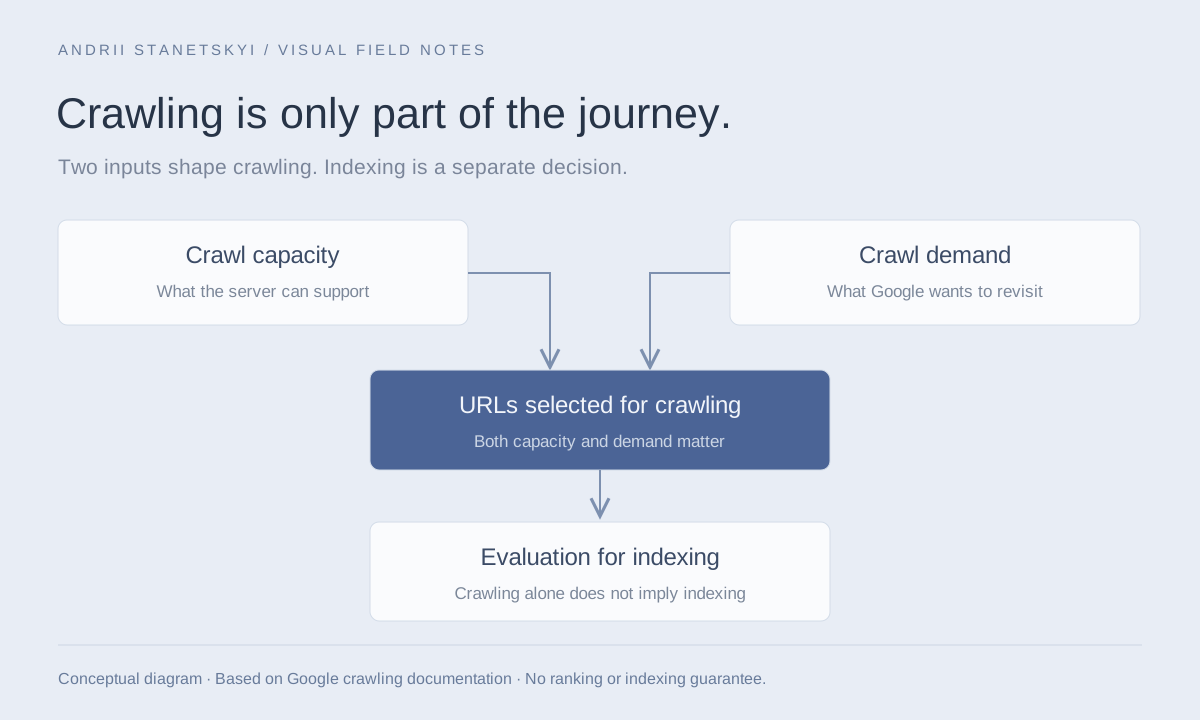
Crawl capacity and crawl demand determine URLs selected for crawling, followed by a separate evaluation for indexing.
How Google's Crawling System Works
Googlebot operates as a distributed system. There are multiple Googlebot variants — Googlebot Smartphone, Googlebot Desktop, Googlebot-Image, Googlebot-Video, Google-InspectionTool — each operating on its own schedule. When people discuss crawl budget in SEO, they typically mean Googlebot Smartphone (the primary crawler since the mobile-first index transition).
The crawl pipeline has three phases:
- URL Discovery: URLs are found via sitemaps, internal links, external links, and previously crawled pages. Discovered URLs enter a queue.
- Scheduling: Google's scheduler prioritizes URLs based on page importance (PageRank signal), freshness signals (lastmod, content change detection), crawl rate constraints, and server response time history.
- Crawling: Googlebot fetches the URL, follows server directives (robots.txt, noindex, canonical), and feeds content into the indexing pipeline.
The key insight: a URL being crawled does not guarantee it gets indexed. Crawling and indexing are separate processes with separate queues and criteria.
Where do the requests go?
Try hypothetical values or a classification from your server logs. This describes requests, not unique pages or indexed URLs.
Total × classified share. Reducing low-value requests does not guarantee that Google reallocates them to other URLs. Read Google’s explanation.
Crawl Rate Limit vs. Crawl Demand: The Two Levers
Google's Gary Illyes described crawl budget as the intersection of two factors: crawl rate limit (how fast Google crawls without overwhelming your server) and crawl demand (how many pages Google thinks are worth crawling).
Crawl Rate Limit
This is Google's automatic throttle to avoid overloading your server. It's determined by your server's response time and error rate history. Servers that respond quickly and consistently get higher crawl rates. You can set a maximum in GSC (legacy settings → crawl rate), but most enterprise sites should leave this at "let Google determine" unless you're actively experiencing server load issues from Googlebot.
Signals that lower your crawl rate limit:
- Sustained server response times above 500ms
- Elevated 5xx error rates
- Connection timeouts or resets
- Slow Time to First Byte (TTFB) on crawled pages
Crawl Demand
This is how many pages Google thinks are worth prioritizing. Pages with more links pointing to them (internal and external) are crawled more frequently. Pages that are rarely linked, have low authority, or have thin content get crawled infrequently or not at all.
You influence crawl demand by: improving internal link structure to important pages, removing low-value pages from the crawlable pool, and ensuring high-value pages have appropriate link equity.
Crawl Budget Wasters: The Complete Taxonomy
Crawl budget wasters are URLs that Googlebot crawls instead of your important content. Every wasted crawl is a crawl that didn't go to a page that matters.
| Waster Type | Typical Volume | Fix Complexity | Priority |
|---|---|---|---|
| Parameterized URLs (tracking, sessions) | Very High (10x+ URL inflation) | Medium | Critical |
| Faceted navigation combinations | Extreme (factorial growth) | High | Critical |
| Redirect chains (3+ hops) | Medium | Low-Medium | High |
| Soft 404 pages | Medium | Low | High |
| Duplicate content (www/non-www, http/https) | Medium | Low | High |
| Paginated series beyond useful depth | Medium | Low | Medium |
| Internal search results pages | Very High | Low (robots.txt) | High |
| Printer-friendly / AMP variants | Low-Medium | Low | Medium |
| Low-quality auto-generated pages | Varies | High | High |
| Archive pages (date-based) | Low-Medium | Low | Low |
URL Parameters: The Biggest Culprit
On a typical e-commerce site, URL parameters can inflate the crawlable URL space by 10-100x. The classic set:
# These all represent the same content
https://www.example.com/category/shoes
https://www.example.com/category/shoes?sort=price_asc
https://www.example.com/category/shoes?sort=price_desc
https://www.example.com/category/shoes?color=red
https://www.example.com/category/shoes?color=red&sort=price_asc
https://www.example.com/category/shoes?page=1
https://www.example.com/category/shoes?sessionid=abc123
https://www.example.com/category/shoes?utm_source=email&utm_medium=blast
https://www.example.com/category/shoes?ref=homepage_banner
If your site has 10,000 base category URLs and each generates even 50 parameter combinations that are crawlable, Googlebot is managing a 500,000+ URL space for what is effectively 10,000 unique pages.
Solutions in order of preference:
- Block parameter-based URLs in robots.txt (for parameters that create no useful unique content)
- Use canonical tags pointing parameter variants to the clean URL
- Configure GSC URL Parameters tool (legacy — less effective than robots.txt)
- Ensure parameter URLs return the same content as their canonical (reduces perceived uniqueness)
Faceted Navigation
The most extreme crawl budget problem in e-commerce. A site with 20 color options, 15 size options, and 10 brand options across 1,000 category pages can theoretically generate 3,000+ unique filter combinations per category × 1,000 categories = 3 million+ URLs, most of which return near-duplicate thin content.
See the faceted navigation SEO guide for the full treatment of this problem.
Optimization Strategies by Site Type
E-Commerce Sites
# robots.txt: Block known parameter wasters
User-agent: *
# Sort/filter parameters
Disallow: /*?sort=
Disallow: /*?filter=
Disallow: /*?view=
# Session and tracking
Disallow: /*?sessionid=
Disallow: /*?PHPSESSID=
Disallow: /*utm_
# Pagination beyond crawl depth
# (Handle via canonical or noindex instead for SEO value preservation)

# Allow important category variants
Allow: /category/
News and Publishing Sites
News sites have the opposite problem: new content needs to be crawled immediately, but archives can be enormous. Strategy: maximize crawl frequency for recent content, deprioritize archives.
# robots.txt: Block archive pages that add no indexing value
User-agent: *
Disallow: /archive/
Disallow: /tag/
Disallow: /author/page/
Disallow: /?s=  # WordPress search
Disallow: /feed/
Pair this with a Google News sitemap that's refreshed every 15–30 minutes to accelerate discovery of breaking content.
SaaS and Programmatic SEO Sites
Programmatic SEO generates pages at scale — city × service combinations, comparison pages, templates. The crawl budget challenge: Google needs to crawl all pages to evaluate quality, but if the quality signal is low on sampled pages, crawl rate is reduced for all.
Optimization: ensure your programmatic pages have substantive, differentiated content. Pages with <300 words of thin template text get crawled infrequently and rarely indexed. Invest in content differentiation per page even at scale.
Measuring Crawl Efficiency with Log Files
The only authoritative source of crawl data is your server access logs. GSC crawl stats are sampled and aggregated. Log files show exactly what Googlebot hit, when, and what response it got.
Extracting Googlebot Data from Nginx Logs
# Filter Googlebot from Nginx access log
grep -i "googlebot" /var/log/nginx/access.log > googlebot-only.log

# Count requests by hour
awk '{print $4}' googlebot-only.log | cut -d: -f1-3 | sort | uniq -c | sort -k2

# Find most-crawled paths
awk '{print $7}' googlebot-only.log | cut -d? -f1 | sort | uniq -c | sort -rn | head -50

# Find response code distribution
awk '{print $9}' googlebot-only.log | sort | uniq -c | sort -rn

# Find slow responses (TTFB > 2 seconds in Nginx log format with $request_time)
awk '$NF > 2.0 {print $NF, $7}' googlebot-only.log | sort -rn | head -20
Calculating Crawl Efficiency Score
# Crawl efficiency = (200 responses to canonical pages) / (total Googlebot requests)
# Anything below 60% is a problem

TOTAL=$(grep -i "googlebot" /var/log/nginx/access.log | wc -l)
USEFUL=$(grep -i "googlebot" /var/log/nginx/access.log | awk '$9 == "200"' | grep -v "\?" | wc -l)
echo "Efficiency: $(echo "scale=2; $USEFUL * 100 / $TOTAL" | bc)%"
ELK Stack / Splunk Queries
For enterprise log infrastructure, use structured queries:
# Splunk: Googlebot crawl efficiency over time
source=/var/log/nginx/access.log user_agent="*Googlebot*"
| eval is_canonical=if(match(uri_path, "^\?") OR match(uri_path, "&"), 0, 1)
| eval is_200=if(status=200, 1, 0)
| timechart span=1h avg(is_canonical) as canonical_ratio avg(is_200) as success_ratio

# ELK (Elasticsearch query via Kibana Dev Tools)
GET /nginx-logs-*/_search
{
  "query": {
    "bool": {
      "must": [
        {"match": {"user_agent": "Googlebot"}},
        {"range": {"@timestamp": {"gte": "now-7d"}}}
      ]
    }
  },
  "aggs": {
    "status_codes": {
      "terms": {"field": "status"}
    },
    "top_crawled_paths": {
      "terms": {"field": "request.path", "size": 100}
    }
  }
}
OnCrawl and Botify for Log Analysis
OnCrawl's log analysis module correlates Googlebot hits with your site's crawl data, showing which pages are crawled but not indexed, and which indexed pages are never crawled (and therefore might be delisted). Botify's FastIndex report shows crawl-to-index lag by content type, which directly measures the impact of crawl budget optimization work.
A key metric in Botify: "crawl ratio" — the percentage of your indexable pages that received a Googlebot visit in a 30-day window. On sites with poor crawl budget management, this can be as low as 20-30% for deep pages. Target: >80% for all pages you care about indexing.
Diagnostic Workflow Step-by-Step
Step 1: Baseline Crawl Metrics
From GSC: Search Console → Settings → Crawl stats. Check daily average, trend, and breakdown by response code. A healthy site shows >90% 200 responses in Googlebot's crawl stats.
Step 2: Log File Extraction and Categorization
Extract 30 days of Googlebot hits. Categorize each URL as: canonical page, parameter variant, blocked-should-not-be-crawled, redirect, error. Calculate what percentage of crawl goes to each category.
Step 3: Identify the Top 10 Wasters
# Find the most-crawled URL patterns
awk '/Googlebot/{print $7}' access.log | sed 's/\?.*//' | sort | uniq -c | sort -rn | head -50

# Find parameter-heavy URLs
awk '/Googlebot/{print $7}' access.log | grep "\?" | sed 's/=.*//' | sort | uniq -c | sort -rn | head -30
Step 4: Implement Fixes and Measure Delta
After implementing robots.txt changes, canonical tags, or removing orphan pages, extract log data for the next 30 days and compare crawl efficiency score. Expect improvement in 4–8 weeks as Google adapts its crawl schedule.
FAQ
Does crawl budget matter for small sites?
For sites under 10,000 pages with good server performance, crawl budget is rarely the constraint. Google will typically crawl small, healthy sites fully within a few days. Focus crawl budget optimization efforts on sites with 100,000+ pages, or any site where log analysis shows Googlebot spending significant time on parameter URLs, redirects, or error pages.
Will blocking pages in robots.txt improve crawl budget for the rest of the site?
Yes, with caveats. Google doesn't crawl robots.txt-blocked URLs, which frees crawl capacity for everything else. However, Google may still request blocked URLs to check their robots.txt status — the request happens, but no content is fetched. The net effect is still positive for crawl efficiency.
How does server speed affect crawl budget?
Directly. Googlebot waits for your server to respond between requests. A server responding in 100ms allows roughly 10x more pages to be crawled per hour compared to one responding in 1000ms. Optimizing TTFB — through caching, CDN, database query optimization — is one of the highest-leverage crawl budget improvements available.
What's the relationship between crawl budget and Core Web Vitals?
Indirect but real. Core Web Vitals affect rankings (a small ranking signal), and higher-ranking pages get crawled more frequently due to crawl demand. More importantly, many CWV problems (slow server responses, large JavaScript bundles) also slow Googlebot's ability to render pages, which adds to crawl processing time. Fixing server performance helps both.
Can I increase my crawl rate limit in GSC?
You can set a minimum in GSC's legacy crawl rate settings, but Google will still use its own judgment above that floor. Setting a higher minimum doesn't guarantee Google will crawl faster — it will only do so if it determines there's value. The better approach is to give Google more valuable pages to crawl (content quality, internal linking) rather than trying to force-increase the rate.
How long after fixing crawl budget issues will I see indexing improvement?
Typically 4–8 weeks for full impact. Google's crawl schedule adapts gradually. You'll see changes in log file crawl patterns within days, but GSC's indexed page count takes longer to reflect the new crawl allocation. Monitor weekly, not daily.
Key Takeaways
- Crawl budget is the product of crawl rate limit (server performance) and crawl demand (page value). Optimize both.
- URL parameter proliferation is typically the largest single crawl budget waster on e-commerce sites.
- Log file analysis is the only reliable way to see what Googlebot is actually crawling. GSC crawl stats are sampled.
- Crawl efficiency score (200 responses to canonical URLs / total Googlebot requests) is your key KPI. Target above 80%.
- Improving server TTFB is a directly measurable crawl budget improvement — faster responses = more pages crawled per day.
- Crawl budget matters for sites with 100k+ pages or severe parameter inflation. Small, well-structured sites rarely have crawl budget constraints.
- Fixes take 4–8 weeks to fully reflect in indexed page counts. Measure log file efficiency weekly, GSC indexed counts monthly.
For the log file analysis workflow in more depth, including Splunk and ELK dashboards, see the log file analysis guide.