Canonical tags are simultaneously one of the most powerful and most misused signals in technical SEO. A single misplaced rel="canonical" can silently drain crawl budget, consolidate equity to the wrong URL, or leave duplicate content issues completely unresolved. This guide covers the mechanics, edge cases, and diagnostics that matter — not the introductory "point duplicates to the original" advice you've already read a hundred times.
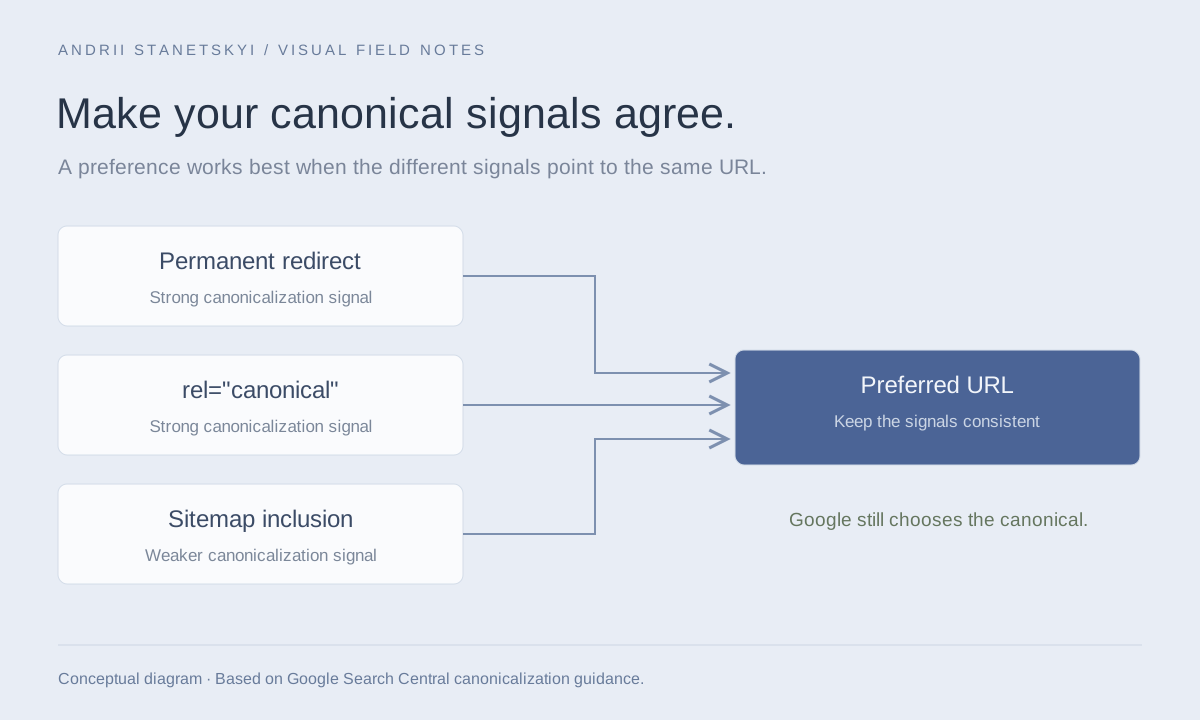
Permanent redirects, canonical annotations, and sitemap inclusion point toward a consistent preferred URL. Google chooses the canonical.
How Canonicals Actually Work (Signal vs. Directive)
The most critical conceptual error practitioners make is treating rel="canonical" as a directive. It is a hint — a strong one, but Google and Bing reserve the right to override it. Google's documentation explicitly states that canonicalization is determined by a range of signals: internal links, sitemaps, redirects, content similarity, PageRank distribution, and the canonical tag itself. The canonical tag is one input into a canonicalization algorithm, not a hard switch.
This matters in practice. If you canonicalize /product?color=blue to /product but 300 internal links point to the color variant and zero point to the canonical, Google may ignore your hint. The linking structure contradicts the declared canonical, and Google resolves conflicts by picking what it believes is the "true" canonical based on the full signal set.
HTTP Header vs. HTML Tag
Canonical hints can be delivered two ways:
# HTTP response header (use for PDFs, non-HTML resources)
Link: <https://example.com/page>; rel="canonical"

# HTML <head> element
<link rel="canonical" href="https://example.com/page" />
The HTTP header is the only option for PDFs, Word documents, and other non-HTML files. Screaming Frog can surface both; Sitebulb's "Response Headers" tab shows the Link header. If you're running a news or document-heavy site, auditing the header variant is non-negotiable.
Canonicalization Signal Hierarchy
| Signal | Strength | Google Behavior |
|---|---|---|
| 301 Redirect | Directive | Nearly always followed; redirected URL deindexed |
| rel=canonical (consistent) | Strong hint | Usually followed when no contradicting signals |
| rel=canonical (contradicted) | Weak hint | May be ignored; Google picks based on other signals |
| Internal links | Strong signal | Most-linked URL preferred as canonical |
| Sitemap inclusion | Moderate hint | Listed URLs preferred; duplicates deprioritized |
| Hreflang annotation | Indirect | URL in hreflang set often treated as canonical for locale |
| noindex | Directive | Overrides canonical; URL not indexed regardless |
When to Use Canonical Tags
URL Parameter Variations
Session IDs, tracking parameters, and sort/filter combinations that don't change core content are canonical targets. The correct implementation canonicalizes each variant to the clean, parameter-free URL:
<!-- On /product?sessionid=abc123&sort=price&ref=newsletter -->
<link rel="canonical" href="https://example.com/product" />
However, if a parameter does change content substantially — pagination, locale, genuine filter that halves the result set — don't canonicalize it away. You'll suppress legitimate unique pages.
Protocol and WWW Variants
If you haven't fully 301-redirected HTTP to HTTPS or non-www to www at the server level (you should have), canonical tags are a fallback. But they're a weak fallback. Fix the redirects; use canonical as belt-and-suspenders.
Syndicated Content
When your content appears on partner sites or aggregators, the partner should include a canonical pointing back to your origin URL. This is commonly neglected. Verify it by fetching the partner's page:
curl -s https://partner-site.com/syndicated-article | grep -i canonical
Print and AMP Pages
<!-- On /article?format=print -->
<link rel="canonical" href="https://example.com/article" />

<!-- On AMP page at /amp/article -->
<link rel="canonical" href="https://example.com/article" />
AMP canonical implementation requires the canonical HTML page to declare AMP equivalence with <link rel="amphtml">, forming a bidirectional pairing. Missing one side breaks the signal.
When to Avoid Canonical Tags
As a Substitute for Redirects
If you've migrated a URL, use a 301. A canonical on the old URL pointing to the new one leaves the old URL crawlable, consuming budget. Googlebot will visit it, read the canonical, and may or may not consolidate equity — but the old URL remains in the crawl queue indefinitely. For migrated URLs: redirect, then add the canonical on the destination as a self-referencing tag.
On Thin or Near-Duplicate Faceted Pages You Want Indexed
Faceted navigation creates a canonicalization trap. If your /category?color=red page has genuine user demand (search volume, conversion data) and unique content, canonicalizing it to /category destroys its indexing potential. The decision requires keyword research and traffic analysis, not a blanket rule.
When Combined with noindex
Putting both noindex and a canonical on the same page creates contradictory signals. noindex tells Googlebot not to index; the canonical says "this is the preferred version." Google resolves this by typically honoring noindex and ignoring the canonical. If your intent is to consolidate equity to another URL, use a 301. If your intent is to remove the page from the index entirely, use noindex alone.
Cross-Domain Canonicals Without Control
Cross-domain canonicals are legitimate — Google supports them — but only use them when you control or explicitly trust the target domain. A canonical pointing to an external domain you don't control transfers your equity and PageRank to that domain. If the target site goes down or changes its content, you've harmed yourself.
Common Mistakes and Their Consequences
1. Canonical Chains
Page A canonicalizes to Page B. Page B canonicalizes to Page C. Google follows chains but may truncate them, especially when the chain is long or involves redirects at intermediate steps. Always canonicalize directly to the final URL.
Detection in Screaming Frog: Configuration → Canonicals → "Canonicals Chains" report. Any entry here is a bug.
2. Canonicalizing Paginated Pages to Page 1
This is one of the most common mistakes on e-commerce sites. If you canonical page 2, 3, 4 of a paginated series to page 1, you tell Google that all the products on those pages are duplicates of page 1. Those products lose discoverability. The correct approach is self-referencing canonicals on each paginated URL, combined with proper internal linking and potentially a view-all page strategy.
<!-- WRONG: On /category?page=2 -->
<link rel="canonical" href="https://example.com/category" />

<!-- CORRECT: On /category?page=2 -->
<link rel="canonical" href="https://example.com/category?page=2" />
3. CMS-Generated Duplicate Canonicals
WordPress with Yoast, WooCommerce, and theme builders frequently output duplicate <link rel="canonical"> tags — one from the theme, one from the plugin. Google uses the first one it encounters. Verify with:
curl -s https://example.com/page | grep -c 'rel="canonical"'
Any result greater than 1 is a problem. GSC's URL Inspection tool shows the canonical Google selected; compare it to what you expect.
4. Relative vs. Absolute URLs
<!-- WRONG: relative canonical -->
<link rel="canonical" href="/page" />

<!-- CORRECT: absolute canonical with protocol -->
<link rel="canonical" href="https://example.com/page" />
Relative canonicals are technically parseable but create ambiguity when the page is served under multiple domains or subdomains. Always use absolute URLs including the protocol.
5. Canonical on Redirected URLs
If Page A redirects to Page B, any canonical on Page A is irrelevant — Googlebot follows the redirect to Page B and reads Page B's canonical. Auditing canonical tags on pages that also return 3xx responses is wasted effort unless you're debugging a crawl path issue.
Diagnostic Workflow
When a URL isn't indexing as expected or equity consolidation isn't working, follow this diagnostic sequence.
Step 1: Fetch the Live Page
curl -s -L https://example.com/page | grep -i canonical
# Check for: number of canonical tags, absolute vs. relative URL, correct destination
Step 2: Check GSC URL Inspection
GSC → URL Inspection → Enter URL. Look at "Google-selected canonical" vs. "User-declared canonical." If they differ, Google has overridden your canonical. Investigate why: check internal link distribution, sitemap entries, and content similarity with the Google-selected version.
Step 3: Analyze Log Files
# Filter Googlebot hits to both the declared canonical and the variant
grep -E "Googlebot" access.log | grep -E "/product|/product\?color" | \
  awk '{print $7}' | sort | uniq -c | sort -rn
If Googlebot is still hitting the variant URL frequently after you've added the canonical, your crawl budget isn't being saved. The canonical is being ignored or the internal linking is too strong on the variant.
Step 4: Run Screaming Frog Canonical Report
Reports → Canonicals → filter by "Non-Indexable Canonical" and "Canonical Mismatch." Export and cross-reference with GSC Coverage data. Pages in GSC "Excluded by canonical tag" should map to intentional canonicalization, not accidental suppression.
Step 5: Cross-Reference with Sitemap
Only canonical URLs should appear in your XML sitemap. Including non-canonical variants in the sitemap sends contradictory signals:
<?xml version="1.0" encoding="UTF-8"?>
<urlset xmlns="http://www.sitemaps.org/schemas/sitemap/0.9">
  <!-- Only list canonical URLs here -->
  <url>
    <loc>https://example.com/product</loc>
    <lastmod>2026-04-01</lastmod>
  </url>
  <!-- Never list /product?color=blue if it canonicalizes to /product -->
</urlset>
Advanced Patterns
Self-Referencing Canonicals
Every indexable page should have a self-referencing canonical. This is belt-and-suspenders protection against scrapers and CDN edge caches that might serve your content under a different URL. It also prevents parameter injection from accidental Googlebot crawl paths.
Cross-Domain Canonicals for Microsites
<!-- On microsite.brand.com/article -->
<link rel="canonical" href="https://www.brand.com/article" />
This is legitimate and well-supported. GSC must have the target domain verified separately. The equity consolidation is real but takes 4–8 weeks to manifest in rankings. Monitor with GSC's "Links" report to ensure cross-domain link attribution is flowing correctly.
E-Commerce Product Variants
For products with color/size variants on separate URLs: only canonicalize variant → parent if the variant page has no unique search demand. Run keyword research per variant. If "blue running shoes size 11" has measurable search volume and your variant page ranks for it, that's a page worth indexing independently. See our faceted navigation guide for the full decision framework.
International Sites and Canonicals
Hreflang and canonical interact. Each locale URL should self-canonicalize. Never canonicalize /fr/page to /en/page — this tells Google the French page is a duplicate of the English page and will suppress it from French SERPs. Hreflang implementation requires self-referencing canonicals to function correctly.
FAQ
Does Google always respect canonical tags?
No. Google treats rel="canonical" as a strong hint, not a directive. When other signals (internal links, redirect chains, content similarity, sitemap inclusion) contradict the canonical, Google picks what it determines is the "true" canonical based on the full signal set. GSC's URL Inspection tool shows you what Google actually selected.
Can I use canonical tags to consolidate PageRank from thousands of faceted URLs?
Yes, but the equity consolidation is gradual — expect 4–12 weeks for significant movement. More importantly, ensure the canonical destination has strong enough content and internal links to absorb and benefit from the consolidated equity. Canonicalizing weak pages together doesn't help much.
What's the difference between a canonical tag and a 301 redirect for duplicate content?
A 301 removes the source URL from Googlebot's crawl queue (it's deindexed after the redirect is processed). A canonical leaves the source URL crawlable — Googlebot will still visit it, just less frequently over time. For URLs you want fully decommissioned, use 301. For URLs that must remain accessible (e.g., old links shared by users), canonical is appropriate.
Should every page have a self-referencing canonical?
Yes. Self-referencing canonicals protect against parameter injection, CDN serving your content under edge-cache URLs, and scraper sites that copy your content without changing it. The overhead is negligible; the protection is real.
How do I audit canonical tags at scale without Screaming Frog hitting rate limits?
Use log file analysis (OnCrawl, Botify, or raw parsing) combined with a sitemap crawl rather than a full site crawl. Extract all URLs from your sitemap, then batch-fetch with a controlled crawler at 2–5 req/s. Alternatively, export GSC's "Excluded" URLs filtered by "Excluded by canonical tag" and cross-reference against your intended canonical map.
My CMS outputs two canonical tags. Which one does Google use?
Google uses the first <link rel="canonical"> it encounters in the HTML. Identify which plugin or template is outputting the unwanted tag and disable it. For WordPress, use Query Monitor to trace which hook outputs each canonical tag.
Can canonical tags hurt SEO?
Absolutely. Misconfigured canonicals are one of the leading causes of unintentional de-indexation. Canonicalizing your homepage to a variant, canonicalizing paginated pages to page 1, or implementing canonical chains can suppress significant portions of your site. Always validate with Google's URL Inspection API after bulk canonical changes.
Key Takeaways
- Canonical tags are hints, not directives. Contradictory signals (internal links, sitemaps) can and do override them.
- Always use absolute URLs with protocol in canonical tags. Relative URLs create ambiguity.
- Every indexable page should have a self-referencing canonical as baseline protection.
- Never combine noindex and canonical on the same page — pick one intent and implement it cleanly.
- Paginated pages must self-canonicalize, not point to page 1.
- Only canonical URLs should appear in XML sitemaps — variance here sends contradictory signals.
- GSC's URL Inspection "Google-selected canonical" field is your ground truth. When it diverges from your declaration, investigate internal linking and sitemap signals first.
- 301 redirects are stronger than canonical tags for decommissioning URLs — don't use canonicals as a redirect substitute.
Conclusion
Canonical tags done right are invisible — they quietly consolidate equity, prevent duplicate content from fragmenting rankings, and guide crawlers efficiently. Done wrong, they silently suppress indexing, waste crawl budget, and send Google contradictory signals it resolves in ways you won't like. The practitioners who get the most out of canonicals are those who treat them as one signal in a system, audit the full signal context, and verify with GSC rather than assuming implementation equals outcome. Build the diagnostic habit: declare, verify, monitor.