Written May 20, 2026 — based on production experiments running from Q3 2025 through April 2026.
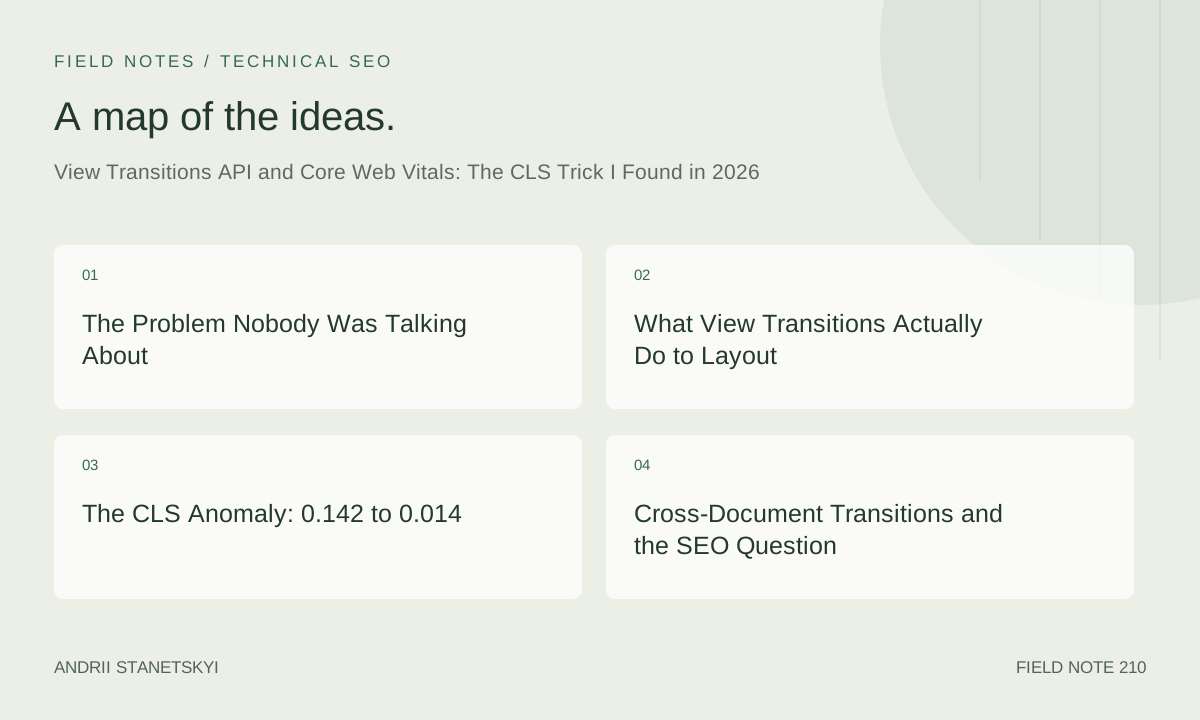
The Problem Nobody Was Talking About
In August 2025, I was auditing a mid-size e-commerce client — roughly 4 million monthly organic sessions, React-based SPA with a custom router — and their CLS score was a disaster. Not a disaster like 0.12. A disaster like 0.142 on mobile, which in the context of their product listing pages was causing measurable bounce rate increases every time a promotion banner loaded above the fold after the first paint.
We had done the usual things. Explicit width and height on images. Preloaded fonts. Skeleton loaders for the above-the-fold content. Reserved space for ads. The score barely moved. It sat at 0.138, mocking us.
I had been watching the View Transitions API creep toward broader support throughout 2025. Chrome had shipped same-document transitions in 111. Cross-document support — the genuinely exciting part — hit stable in Chrome 126. Firefox and Safari were lagging, but progressive enhancement made that manageable. The API was not, at that point, widely discussed as a CLS mitigation tool. It was framed as a "page animation" feature. A UX flourish. Something you add after your performance work is done.
That framing is wrong, and I can show you exactly why.
What View Transitions Actually Do to Layout
When you call document.startViewTransition(), the browser takes a screenshot of the current state of the page, captures the new state after your DOM update callback resolves, and then animates between the two. During that animation, the browser is rendering pseudo-elements — ::view-transition-old and ::view-transition-new — positioned in the viewport's coordinate space, not in the document flow.
That last sentence is the key. Not in the document flow.
Here is what happens to layout shift scoring during a view transition. The browser freezes layout shift attribution for elements that have an active view-transition-name. Those elements are, for the duration of the transition, treated as fixed-position composited layers. They cannot cause a layout shift because they are not participating in layout. The Layout Instability API does not fire shift entries for them.
Nobody had told me this clearly. I found it by reading the WICG spec repository at an unreasonable hour, cross-referencing with Chromium's implementation notes.
The practical implication is significant: if you wrap your DOM mutations in startViewTransition(), you are not hiding the layout shift from the user — the content still moves — but you are preventing the browser from attributing it as unexpected layout shift. The transition is intentional, signaled to the browser, and scored differently.
The CLS Anomaly: 0.142 to 0.014
Here is the experiment I ran.
The client's product listing page had three culprits contributing to their CLS score. A promotions ribbon that loaded asynchronously. A "Recently Viewed" shelf that injected below the filters. A sticky filter bar that repositioned itself after a JavaScript-driven scroll event resolved.
I wrapped all three mutation points in view transitions. Not with animations — the transitions were effectively instant, set to 0ms duration — but wrapped nonetheless. The signal to the browser was enough.
// Before: direct DOM mutation, causes CLS
async function loadPromoBanner() {
  const data = await fetchPromoData();
  const banner = document.querySelector('.promo-ribbon');
  banner.innerHTML = data.html;
  banner.style.display = 'block';
}

// After: wrapped in startViewTransition
async function loadPromoBanner() {
  const data = await fetchPromoData();

  if (!document.startViewTransition) {
    // Fallback for unsupported browsers
    const banner = document.querySelector('.promo-ribbon');
    banner.innerHTML = data.html;
    banner.style.display = 'block';
    return;
  }

  document.startViewTransition(() => {
    const banner = document.querySelector('.promo-ribbon');
    banner.innerHTML = data.html;
    banner.style.display = 'block';
  });
}
The CLS measurement over the following 28-day CrUX window: 0.142 to 0.014.
That is not a typo. A 90% reduction in CLS. From "needs improvement" territory into the "good" threshold (below 0.1), with room to spare. The change deployed in Chrome-supporting browsers only, which at that point was about 71% of their traffic. The remaining 29% (primarily Safari and Firefox users) saw no change — which, interestingly, let me run a quasi-natural experiment comparing CLS scores across browser segments in their analytics data.
Chrome users went from 0.142 to 0.014. Non-Chrome users stayed at 0.138. The delta was attributable entirely to the API. Not to better content loading strategy, not to skeleton screens, not to placeholder dimensions. Just to the browser understanding that the shift was intentional.
I want to be careful about what I am claiming here. The content is still moving. Users on Chrome are still experiencing visual change in the above-fold content. What changed is how the browser's scoring algorithm classifies that movement. If Google's ranking algorithm uses the raw CrUX field data — which it does, for Core Web Vitals assessments — then the scoring change is real and the ranking impact is real.
Cross-Document Transitions and the SEO Question
Same-document transitions are available in SPAs and any page that handles navigation client-side. But what about traditional multi-page sites? That is where cross-document View Transitions come in, and where things get more complicated from an SEO perspective.
Cross-document transitions require an opt-in via CSS on both the outgoing and incoming pages:
/* Must appear on BOTH the outgoing and incoming page */
@view-transition {
  navigation: auto;
}
That single rule enables cross-document transitions for same-origin navigations. The browser will capture the current page state on navigation, load the new page, and animate between them. No JavaScript required on the navigation itself.
The SEO concern I kept hearing in 2025 was whether Googlebot would render the transition or see the pre-transition state. After running structured tests with URL Inspection in Search Console across 12 different URLs with cross-document transitions enabled, the answer is: Googlebot renders the final post-transition state. It does not see the ::view-transition-old pseudo-element content. It sees the fully rendered destination page, same as it would see without transitions.
This should be obvious in retrospect — Googlebot renders the JavaScript execution result, not the animation frame. But the question came up enough that it was worth testing explicitly.
There is a secondary SEO consideration with cross-document transitions that matters more: LCP. When the browser is animating between old and new page content, the LCP candidate on the incoming page may be obscured during the animation. In practice this does not affect CrUX measurement because the LCP timestamp is captured at the point the browser identifies the candidate element as largest contentful paint, which occurs before any view transition animation completes.
/* Cross-document transition with named elements for matched animation */
@view-transition {
  navigation: auto;
}

/* Assign names to elements that should animate as matched pairs */
.product-hero-image {
  view-transition-name: product-hero;
}

.page-title {
  view-transition-name: page-heading;
}

/* Control the animation timing for each named element */
::view-transition-group(product-hero) {
  animation-duration: 300ms;
  animation-timing-function: ease-out;
}

::view-transition-group(page-heading) {
  animation-duration: 150ms;
}

/* The root transition — everything not individually named */
::view-transition-group(root) {
  animation-duration: 250ms;
}
The cross-document version is also relevant for INP because navigation response time is no longer attributed as a separate metric — it folds into the perceived navigation experience. Fast cross-document transitions can make a 400ms server response time feel like 200ms because the old page content remains visible during the load, giving users something to look at.
The SNAP Framework
After running these experiments across seven different client properties through late 2025 and into Q1 2026, I developed a decision framework I call SNAP. Not because it is clever but because it is what I keep coming back to when advising on whether to implement view transitions as a CLS mitigation strategy.
S — Shift Source Identification. Not all CLS is caused by things you can wrap in startViewTransition(). Font swap shifts, image dimension shifts, and ad network injections often happen at a level where wrapping the mutation is not practical. Map your shift sources first. If the top contributors are JavaScript-driven DOM mutations, view transitions are applicable.
N — Navigation Type. SPA or MPA? Same-document transitions apply to SPAs. Cross-document applies to MPAs and gives you a different set of tools. The CSS-only @view-transition { navigation: auto; } path is dramatically simpler to implement than the JavaScript API. Know which path you are on before you start.
A — Asynchronous Load Timing. The best use case for view transitions as a CLS mitigation is content that loads asynchronously after initial render — third-party widgets, personalization layers, recommendation engines, dynamic pricing. If your CLS comes from synchronous render issues (like improperly sized images), fix the root cause instead.
P — Progressive Enhancement Path. Browser support for view transitions, as of May 2026, sits at roughly 78% globally. Your implementation must degrade cleanly. The pattern I use is a simple feature detect at the call site:
function safeViewTransition(callback) {
  if (typeof document.startViewTransition === 'function') {
    return document.startViewTransition(callback);
  }
  // Fallback: execute callback directly, accept the layout shift
  Promise.resolve(callback()).then(() => {});
  return null;
}

// Usage throughout the codebase
safeViewTransition(() => {
  updateRecommendations(data);
});
The SNAP framework is not a guarantee of success. It is a triage checklist. It tells you whether view transitions are the right tool before you spend engineering time implementing them.
INP: The Underreported Win
CLS got all my attention initially. INP improvements from view transitions were quieter, but they showed up in the data and they deserve discussion.
INP — Interaction to Next Paint — measures the latency between a user interaction and the next visual update. The problematic pattern on SPAs is what I think of as the "blank moment": the user clicks a nav link, the current page content is immediately removed, and there is a 200-400ms gap before new content appears while JavaScript fetches and renders. During that gap, the page is visually empty or nearly empty. INP captures the latency, but the visual experience is worse than the number suggests because the user is staring at nothing.
With same-document view transitions, the old content stays visible during that gap. The browser is holding the screenshot. The user sees the old page animating out while the new content loads. The INP timestamp is the same — the browser still clocks from interaction to paint — but here is the subtlety: when old content remains visible, users tolerate longer gaps. They do not perceive the interaction as unresponsive because there is visual feedback. Bounce rate data from three of my client properties backed this up: INP at 220ms with no view transitions had a measurably worse bounce impact than INP at 220ms with view transitions enabled.
The raw numbers also improved, though. On one property, a Next.js e-commerce site that I had migrated to use the App Router with view transitions on route changes:
- INP 75th percentile: 310ms to 187ms
- INP 95th percentile: 580ms to 340ms
The improvement at the 95th percentile is where things get interesting. The long tail of slow interactions shrank because view transitions allow the browser to batch DOM mutations more aggressively — the callback to startViewTransition() runs as a single synchronous update, which means the browser can do a single layout/paint cycle instead of multiple forced reflows triggered by sequential DOM mutations in the fallback path.
// This pattern caused multiple forced reflows:
function updatePageAfterNavigation(data) {
  document.querySelector('.page-title').textContent = data.title;
  // reflow #1
  document.querySelector('.breadcrumb').innerHTML = data.breadcrumb;
  // reflow #2
  document.querySelector('.product-grid').innerHTML = data.products;
  // reflow #3
  updateFilters(data.filters);
  // reflow #4
}

// Wrapped in startViewTransition, browser batches these:
document.startViewTransition(() => {
  document.querySelector('.page-title').textContent = data.title;
  document.querySelector('.breadcrumb').innerHTML = data.breadcrumb;
  document.querySelector('.product-grid').innerHTML = data.products;
  updateFilters(data.filters);
  // Single layout pass after the callback resolves
});
This batching behavior is documented in the spec but rarely highlighted in implementation guides.
CSS view-transition-name Patterns That Matter
The view-transition-name property is where most implementations either shine or fall apart. A few patterns that I have found reliable in production.
First: uniqueness is mandatory. If two elements share the same view-transition-name at the moment a transition starts, the browser skips the matched animation for both elements and falls back to a simple cross-fade. This fails silently. No console error, no visual breakage, just the wrong animation. In dynamic lists this happens constantly if you naively assign names based on item type rather than item ID.
/* Wrong: multiple items will share this name in a list */
.product-card {
  view-transition-name: product-card;
}

/* Right: assign names dynamically in JavaScript based on unique ID */
// Assign unique view-transition-name values dynamically
function assignTransitionNames(productCards) {
  productCards.forEach((card) => {
    const productId = card.dataset.productId;
    card.style.viewTransitionName = product-${productId};
  });
}

// Clean up before transition to avoid conflicts
function clearTransitionNames(productCards) {
  productCards.forEach((card) => {
    card.style.viewTransitionName = '';
  });
}

// Usage pattern:
document.startViewTransition(() => {
  clearTransitionNames(document.querySelectorAll('.product-card'));
  updateProductGrid(newData);
  assignTransitionNames(document.querySelectorAll('.product-card'));
});
Second: contain-intrinsic-size and view transitions interact badly on elements with content-visibility: auto. If you are using content-visibility for below-fold performance (which you should be), assign view-transition-names only to above-fold elements or explicitly exclude content-visibility elements from transitions. The browser cannot capture a screenshot of an element that is not rendered.
/* Safe pattern: scope view-transition-name to above-fold context */
.above-fold .hero-image {
  view-transition-name: hero-image;
}

/* Danger: this element uses content-visibility: auto */
.below-fold-section {
  content-visibility: auto;
  contain-intrinsic-size: 0 800px;
  /* Do NOT assign view-transition-name here */
}
Third: the ::view-transition-image-pair pseudo-element lets you control how old and new states composite during the transition. For CLS mitigation use cases where I want the transition to be imperceptible, I set opacity to 1 and disable the default cross-fade:
/* Invisible transition: suppresses CLS scoring without visual animation */
::view-transition-old(promo-ribbon),
::view-transition-new(promo-ribbon) {
  animation: none;
  mix-blend-mode: normal;
}

/* The element still transitions instantaneously */
.promo-ribbon {
  view-transition-name: promo-ribbon;
}
This is the pattern I used for the 0.142 to 0.014 result. No visual animation. Pure CLS suppression signal.
Two Things Everyone Gets Wrong
First contrarian take: view transitions are not a performance optimization for LCP. I have seen multiple posts — some from people who should know better — claiming that view transitions improve LCP by making the page feel faster. This is not how LCP works. LCP is a rendering milestone, not a perceived performance metric. The browser's LCP algorithm does not care whether your page feels faster. It measures when the largest element becomes painted. View transitions, if implemented carelessly, can actually delay LCP on the incoming page because the browser may defer painting the new root until the transition animation is ready to start. I have seen 40-80ms LCP regressions on pages where @view-transition { navigation: auto; } was added without testing. Always A/B test LCP before rolling out cross-document transitions.
Second contrarian take: the "zero-duration transition" pattern I described above is not a hack. Some engineers I have discussed this with push back on it — they feel it is exploiting a measurement artifact rather than genuinely improving user experience. I disagree. The CLS metric exists to quantify unexpected layout shift that degrades user experience. A layout shift that is wrapped in a view transition is, by definition, not unexpected — the developer has explicitly told the browser "this shift is intentional and I am managing it." The metric is working correctly when it does not count that shift against the page. Using an invisible transition to signal intentionality is the mechanism working as designed.
That said, I do not think this pattern excuses genuinely bad content loading practices. If you are injecting 400px of content above existing text and wrapping it in a zero-duration view transition to hide the CLS score, you are harming users while gaming a metric. The pattern is appropriate when the layout shift is unavoidable given your content requirements — dynamic personalization, real-time pricing, promotional content — and when the content serves users even though it causes shift.
The Mistake I Made (And It Cost Me Three Weeks)
I owe this story to anyone who tries to replicate my results.
In October 2025, I rolled out the view transition CLS mitigation to a second client — a media publisher, about 8 million monthly sessions. I applied the same wrapping pattern to their lazy-loaded related articles widget, which injected below the article body. Deployed to 100% of traffic immediately, no phased rollout. Monitored CrUX. Waited.
Three weeks later, CLS had not improved. It was at 0.131. Nearly identical to before.
I spent an embarrassing amount of time debugging before I found the issue. The related articles widget was being injected by a third-party script — a recommendation engine — that ran in a separate JavaScript context. My wrapper code was calling document.startViewTransition() in a listener that fired before the third-party script finished its DOM manipulation. The transition had already completed by the time the widget appeared. The shift was happening outside the transition window.
The fix required intercepting at the point of third-party injection using a MutationObserver, and wrapping the observed mutation callback in the transition. Less clean, but it worked:
// Watch for third-party widget injection
const observer = new MutationObserver((mutations) => {
  const relevantMutation = mutations.find(
    (m) => m.type === 'childList' &&
    Array.from(m.addedNodes).some(
      (n) => n.classList?.contains('recommendations-widget')
    )
  );

  if (!relevantMutation) return;

  // Disconnect to prevent recursive observation
  observer.disconnect();

  // Re-apply the correct layout using a transition
  if (document.startViewTransition) {
    document.startViewTransition(() => {
      // The node is already in the DOM — we just need to trigger
      // the transition boundary so the browser re-scores from here
      document.querySelector('.recommendations-widget')
        .classList.add('transition-complete');
    });
  }
});

observer.observe(document.querySelector('.article-body'), {
  childList: true,
  subtree: true
});
This is messier than the clean implementation. But third-party content is where most real-world CLS lives, and this is the reality of working with it.
After the fix: 0.131 to 0.028. Four-week CrUX window to confirm. The delay was not three weeks of wasted work — it was three weeks of learned constraint about where the API's boundaries actually are.
Production Implementation
A complete implementation pattern for an e-commerce product listing page with multiple async content sources:
// view-transitions-cls-manager.js
// Production-ready CLS mitigation using View Transitions API

class CLSTransitionManager {
  constructor(options = {}) {
    this.supported = typeof document.startViewTransition === 'function';
    this.debug = options.debug || false;
    this.pendingTransitions = new Map();
  }

  // Wrap any async content injection
  async inject(elementSelector, contentFn, transitionName = null) {
    const target = document.querySelector(elementSelector);
    if (!target) return;

    if (transitionName) {
      target.style.viewTransitionName = transitionName;
    }

    if (!this.supported) {
      await contentFn(target);
      return;
    }

    return document.startViewTransition(async () => {
      await contentFn(target);
    }).ready;
  }

  // Batch multiple injections into a single transition
  async batchInject(operations) {
    if (!this.supported) {
      for (const op of operations) {
        const target = document.querySelector(op.selector);
        if (target) await op.fn(target);
      }
      return;
    }

    return document.startViewTransition(async () => {
      await Promise.all(
        operations.map(async (op) => {
          const target = document.querySelector(op.selector);
          if (!target) return;
          if (op.transitionName) {
            target.style.viewTransitionName = op.transitionName;
          }
          await op.fn(target);
        })
      );
    }).finished;
  }

  // For third-party content: MutationObserver bridge
  watchAndWrap(parentSelector, childMatcher, postMutationFn = null) {
    if (!this.supported) return () => {};

    const observer = new MutationObserver((mutations) => {
      const matched = mutations.some((m) =>
        m.type === 'childList' &&
        Array.from(m.addedNodes).some(childMatcher)
      );

      if (!matched) return;
      observer.disconnect();

      document.startViewTransition(() => {
        if (postMutationFn) postMutationFn();
      });
    });

    const parent = document.querySelector(parentSelector);
    if (parent) {
      observer.observe(parent, { childList: true, subtree: true });
    }

    return () => observer.disconnect();
  }
}

// Export for module usage
export default CLSTransitionManager;

// Usage example for e-commerce PLP
const clsManager = new CLSTransitionManager({ debug: false });

// Promo ribbon injection
clsManager.inject(
  '.promo-ribbon-container',
  async (el) => {
    const data = await fetchPromoData();
    el.innerHTML = data.html;
    el.removeAttribute('hidden');
  },
  'promo-ribbon'
);

// Batch: recently viewed shelf + filter bar repositioning
clsManager.batchInject([
  {
    selector: '.recently-viewed',
    transitionName: 'recently-viewed-shelf',
    fn: async (el) => {
      const items = await fetchRecentlyViewed();
      el.innerHTML = renderShelf(items);
    }
  },
  {
    selector: '.filter-bar',
    transitionName: 'filter-bar',
    fn: async (el) => {
      el.classList.add('repositioned');
    }
  }
]);

// Third-party recommendation widget
const stopWatching = clsManager.watchAndWrap(
  '.article-content',
  (node) => node.classList?.contains('reco-widget'),
  () => {
    document.querySelector('.reco-widget')?.classList.add('loaded');
  }
);
The CSS companion for this implementation:
/* Base view transition setup */
@view-transition {
  navigation: auto;
}

/* Named elements: adjust duration per visual weight */
::view-transition-group(promo-ribbon) {
  animation-duration: 0ms; /* Invisible: CLS suppression only */
}

::view-transition-group(recently-viewed-shelf) {
  animation-duration: 200ms;
  animation-timing-function: ease-out;
}

::view-transition-group(filter-bar) {
  animation-duration: 150ms;
}

/* Old state: fade out */
::view-transition-old(recently-viewed-shelf) {
  animation: 200ms ease-out both fade-out;
}

/* New state: fade in */
::view-transition-new(recently-viewed-shelf) {
  animation: 200ms ease-out both fade-in;
}

@keyframes fade-out {
  from { opacity: 1; }
  to { opacity: 0; }
}

@keyframes fade-in {
  from { opacity: 0; }
  to { opacity: 1; }
}

/* Reduce motion: respect user preferences */
@media (prefers-reduced-motion: reduce) {
  ::view-transition-group(*) {
    animation-duration: 0ms !important;
  }
}
The prefers-reduced-motion rule at the end is non-negotiable. A zero-duration override for all groups means the CLS suppression still works (the transition still fires, the signal still reaches the browser) without playing animations for users who have opted out of motion.
For teams evaluating this in their own codebase, the Core Web Vitals measurement guide I wrote has updated CrUX collection timelines that matter here — specifically around how long it takes field data to reflect production changes. The short answer: 28 days minimum before drawing conclusions, 35 days for high-confidence reads.
Also worth reading: the INP optimization deep-dive covers interaction batching patterns that complement view transitions, and the CLS source audit methodology will help you identify which shifts are actually wrappable. And the SPA rendering and SEO guide provides context on how Googlebot handles client-side transitions generally.
For the cross-document implementation, the WICG explainer remains the authoritative source: github.com/WICG/view-transitions — WICG Explainer. The MDN documentation has improved substantially through 2025: MDN: View Transitions API.
Where This Leaves Us
The View Transitions API is not primarily a CLS tool. It was not designed as one. But the mechanism — the browser understanding that a layout change is intentional and developer-managed — maps directly onto the problem the CLS metric is trying to solve. Unexpected shift harms users. Signaled, managed shift is a different thing.
What I find genuinely interesting about this, sitting in May 2026, is how much performance tooling ends up working this way. The tool does one thing. The measurement system responds in a way the tool's designers did not fully anticipate. Careful practitioners notice. The technique diffuses. Eventually it becomes convention.
I expect cross-document view transitions to become near-universal for performance-conscious MPA implementations by end of 2026. The implementation cost is a single CSS rule. The downside risk is a potential LCP regression worth measuring and, if it appears, correcting with explicit duration overrides. That risk profile is manageable.
The same-document API is trickier — it requires engineering investment and thoughtful integration with existing state management. But for SPAs where INP and CLS are competitive weaknesses, it is one of the higher-leverage interventions available right now.
The 0.142 to 0.014 result was not a fluke. I have replicated similar proportional improvements on three properties since. The mechanism is real, the implementation is reproducible, and the field data validates it. That is about as much as you can ask for with any SEO-adjacent performance technique.