Images are simultaneously one of the most valuable traffic sources in SEO and one of the most neglected. Google Images drives billions of searches monthly. Image carousels appear in roughly 22% of SERPs for informational queries. And yet most sites treat images as decoration — uncompressed, generically named, with missing or spammy alt text. This guide covers the complete image SEO framework: from alt text strategy to WebP/AVIF format selection, lazy loading implementation, and the Core Web Vitals implications of every image decision you make.
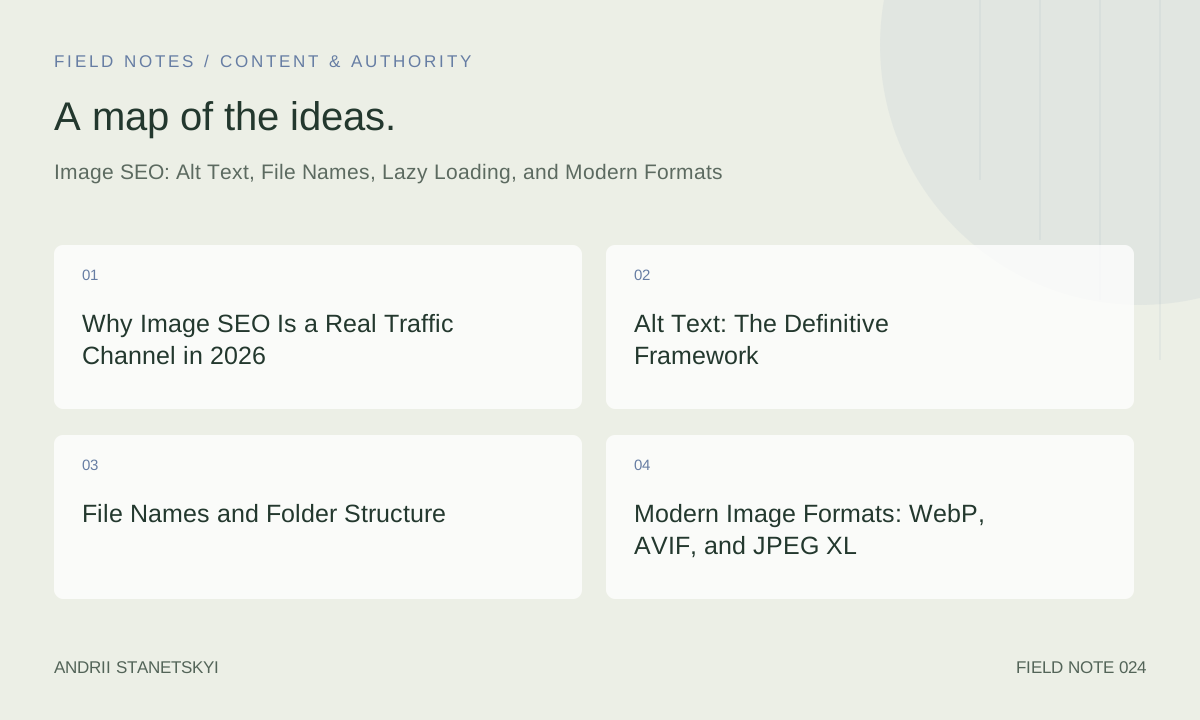
Why Image SEO Is a Real Traffic Channel in 2026
Google Images accounts for approximately 22.6% of all web searches (SparkToro, 2024). For product searches, recipes, travel destinations, and how-to content, image results frequently outperform text results in click-through. The integration of image results into AI Overviews — where Google surfaces image carousels within generative answers — creates additional visibility opportunities for pages with strong image SEO signals.
The mechanism is direct: Google's image search crawls images independently of page crawls, reads alt text and surrounding context to understand image content, and ranks images based on a combination of image relevance, page authority, and user behavior signals. A page that wins 20 positions in Google Images for product-related queries generates incremental clicks that don't appear in your "organic search" GSC report — they're in the separate "Google Images" search type filter.
Beyond traffic, image SEO has a second dimension: Core Web Vitals. LCP (Largest Contentful Paint) is driven by the largest visible element on page load — frequently an image. A mis-sized, poorly compressed, or lazily loaded hero image can be the single largest contributor to a poor LCP score, directly affecting your page experience signals.
Alt Text: The Definitive Framework
What Alt Text Actually Does
The alt attribute serves three distinct functions: it's the text displayed when an image fails to load, it's the primary text read by screen readers for visually impaired users, and it's the primary text signal Google uses to understand what an image depicts. All three functions require the same thing: a descriptive, accurate, natural-language description of the image's content and context.
The Alt Text Formula
The formula for effective alt text: [What the image shows] + [Context relevant to surrounding content]. For a product photo of running shoes on an e-commerce page: "Blue Nike Air Zoom Pegasus 41 men's running shoe, lateral view". This describes what's shown (blue Nike shoe, specific model, men's, lateral view) with enough specificity for both accessibility and image search relevance.
For a blog post about "Core Web Vitals optimization" that includes a screenshot of Lighthouse results: "Google Lighthouse performance report showing LCP of 1.8 seconds and CLS of 0.02 for a retail e-commerce homepage". The alt text provides context (Google Lighthouse report), specific data (LCP 1.8s, CLS 0.02), and page type (retail e-commerce homepage) — none of which is visible in the image file name.
What Alt Text Should Never Be
- Empty on meaningful images:
alt=""is correct only for decorative images that add no informational value. Every image that conveys information requires descriptive alt text. - Keyword-stuffed: "SEO SEO optimization best SEO practices SEO tools" is spam. Google can detect it and it fails WCAG 2.1 accessibility standards.
- File name repetition:
alt="image-12345.jpg"is worse than an empty alt attribute. - Generic descriptions: "Photo of a person" or "Screenshot" provide zero SEO or accessibility value.
- Redundant with surrounding text: If the caption immediately below the image already describes it fully, the alt text can be a shorter variant rather than an identical repetition.
Decorative Images: When to Use Empty Alt
Decorative images — dividers, background textures, purely aesthetic icons — should use alt="" (empty alt attribute, not missing). This tells screen readers to skip the element. Missing alt text is an accessibility violation that forces screen readers to announce the file name, which creates a poor experience. Empty alt is intentional and correct for decorative elements.
| Image Type | Alt Text Approach | Example |
|---|---|---|
| Product photo | Brand + model + key attributes + angle | "Nike Air Max 270 black/white men's lifestyle sneaker, front view" |
| Informational screenshot | Tool/context + key data shown | "Ahrefs Site Audit showing 47 broken internal links across a 12,000-page e-commerce site" |
| Infographic | Summary of key data in the infographic | "Chart showing Google ranking factor correlation study: backlinks 0.23 correlation, content relevance 0.31 correlation" |
| Author/team photo | Name + role | "Jane Smith, Senior Technical SEO Specialist" |
| Decorative background | Empty alt alt="" |
(No text — explicitly empty) |
| Icon with adjacent label | Empty alt (icon is redundant with label) | (No text — label handles accessibility) |
File Names and Folder Structure
File Naming Best Practices
Google's John Mueller has confirmed that image file names are a relevance signal. The file name is the first signal Google has before reading surrounding text or alt attributes. Best practices:
- Use lowercase, hyphen-separated words:
nike-air-max-270-black-mens.webp - Include the primary descriptive keyword:
technical-seo-audit-checklist.png - Avoid generic names:
image1.jpg,photo.png,DSC_00847.jpg - Avoid underscores: Google treats hyphens as word separators; underscores combine words into one token
- Keep names under 50 characters to avoid truncation in directory listings
Folder Structure and URL Path
The full image URL is a relevance signal. /images/products/mens-shoes/nike-air-max-270-black-mens.webp provides far more context than /uploads/2024/11/img8473.jpg. Organize image directories by content category. On WordPress, configure the media upload structure to use category-based folders rather than date-based folders, which provide no semantic value.
Modern Image Formats: WebP, AVIF, and JPEG XL
The Format Decision Matrix
Choosing the right format is a balance of compression efficiency, browser support, encoding time, and image quality requirements.
| Format | Compression vs JPEG | Browser Support | Best Use Case | Encoding Speed |
|---|---|---|---|---|
| JPEG | Baseline | 100% | Legacy fallback | Fast |
| WebP | 25–35% smaller | 97%+ | Most photos, product images | Fast |
| AVIF | 40–55% smaller | 93%+ | High-quality photos, hero images | Slow (encoding) |
| JPEG XL | 30–60% smaller | 75%+ (still rolling out) | Future-forward, high-fidelity images | Moderate |
| PNG | Larger than JPEG | 100% | Logos, transparency, UI elements | Fast |
| SVG | Smallest (for vector) | 99%+ | Icons, logos, illustrations | N/A (vector) |
Implementation: The <picture> Element for Format Fallbacks
<picture>
  <source srcset="/images/hero.avif" type="image/avif">
  <source srcset="/images/hero.webp" type="image/webp">
  <img src="/images/hero.jpg" alt="Technical SEO audit dashboard showing site health score"
       width="1200" height="630" loading="eager" fetchpriority="high">
</picture>
This pattern serves AVIF to browsers that support it, WebP to the next tier, and JPEG as a universal fallback. The width and height attributes are mandatory for CLS prevention — they reserve layout space before the image loads.
Lazy Loading: Implementation and Edge Cases
Native Lazy Loading Basics
The loading="lazy" attribute tells the browser to defer loading the image until it enters the viewport. Implementation is a single HTML attribute addition:
<img src="/images/blog-photo.webp" alt="Screaming Frog crawl depth report"
     width="800" height="450" loading="lazy">
Browser support is 96%+ across Chrome, Firefox, Edge, and Safari. No JavaScript dependency, no library required. This should be the default for all images below the fold.
Critical Edge Cases
Never lazy-load the LCP image. The Largest Contentful Paint element should load as early as possible. If your hero image or above-the-fold product photo is lazy-loaded, you're deliberately delaying the LCP — Google's Core Web Vitals measurement will reflect this. Use loading="eager" (or omit the attribute, as eager is the default) for above-the-fold images, and add fetchpriority="high" to the LCP image specifically.
Lazy loading and SEO crawlers. Googlebot renders JavaScript and handles lazy loading correctly. However, other SEO crawlers (Screaming Frog in non-JS mode, Sitebulb in non-JS mode) will miss lazy-loaded images in alt text audits. Always run audits with JavaScript rendering enabled to capture the full image inventory.
Intersection Observer vs. native lazy loading. If you're using a JavaScript Intersection Observer for more granular control (e.g., loading images 400px before viewport entry rather than the browser's default threshold), ensure the Observer is implemented with a fallback for browsers where the Intersection Observer API is unavailable. Native lazy loading is preferred for simplicity and Googlebot compatibility.
Core Web Vitals and Image Performance
LCP Optimization for Images
LCP is the time at which the largest visible content element is rendered. For most pages, this is the hero image. The 2026 "Good" LCP threshold remains 2.5 seconds. Key optimizations:
- Preload the LCP image:
<link rel="preload" as="image" href="/hero.avif" fetchpriority="high">in the<head> - Serve from CDN edge nodes: Reduces TTFB for the image request
- Compress to target file size: Hero images above 150–200KB are almost always too large for fast LCP
- Set explicit width/height attributes: Prevents layout shifts that delay LCP trigger timing
- Avoid CSS background-image for LCP elements: CSS backgrounds are not eligible for LCP measurement and don't benefit from preload; use
<img>elements for LCP candidates
CLS: Preventing Layout Shift from Images
Cumulative Layout Shift (CLS) occurs when an image loads and pushes surrounding content. The fix is always the same: always specify width and height attributes on <img> elements. With these attributes, the browser reserves the exact space for the image before it loads, preventing layout shift. The CSS aspect-ratio property achieves the same result for responsive images.
Structured Data for Images
Images embedded within structured data entities — such as Product, Recipe, Article, and VideoObject — receive additional visibility in rich results. The image property in schema.org structured data tells Google which image represents the entity. Recommended dimensions: 1200×630px for Article/News images (optimized for social sharing as well), square images (1:1) for Product schema, 16:9 images for recipe and how-to rich results.
For Google Images specifically, use the Google's image best practices documentation to validate that your images meet quality and format requirements for rich result eligibility.
See our structured data implementation guide for complete schema templates.
FAQ
Does Google use alt text as a ranking signal for text search (not just image search)?
Yes. Alt text contributes to the page's overall semantic understanding. An image with alt text referencing "Core Web Vitals audit checklist" on a page about technical SEO reinforces the page's topical relevance for those queries. The contribution is smaller than the body text signal but measurable, especially for pages with large proportions of visual content relative to text.
Should I use WebP or AVIF in 2026?
Use both via the <picture> element — AVIF as the primary source, WebP as the fallback. AVIF delivers 40–55% better compression than JPEG compared to WebP's 25–35%, making it superior for high-quality images like hero photos and product imagery. AVIF's encoding speed is slower, which matters at scale, so evaluate your CDN's real-time optimization capability (Cloudflare, Cloudinary, and Imgix all support automatic AVIF serving with WebP fallback).
How do I bulk-audit alt text across a large site?
Screaming Frog: run a crawl with JavaScript rendering enabled, go to the Images tab, and filter for "Missing Alt Text" and "Alt Text Over 100 Characters." Export to CSV. For prioritization, cross-reference against high-traffic pages in GSC — fix missing alt text on pages that already rank and receive traffic first, as they represent the immediate opportunity cost.
Does lazy loading hurt SEO?
When implemented correctly — on below-the-fold images only — lazy loading does not hurt SEO. Googlebot renders JavaScript and processes lazy-loaded images. The SEO risk occurs when lazy loading is applied to the LCP element (hero image), which delays LCP measurement and degrades Core Web Vitals scores. Always exclude above-the-fold images from lazy loading.
What dimensions should I use for blog post images?
A practical standard for 2026: 1200×630px for featured/hero images (matches OG image requirements and social card dimensions), 800×450px for in-content images, 400×400px for inline product shots or thumbnails. Always serve responsive sizes using srcset so mobile devices receive appropriately sized images rather than downloading full desktop-resolution files on 320px screens.
How do I get images into Google Discover?
Google Discover image eligibility requires images of at least 1200px wide, enabled via the max-image-preview:large robots meta tag. Without this tag, Google uses only small thumbnail previews in Discover, which dramatically reduces CTR. Add <meta name="robots" content="max-image-preview:large"> to all pages you want eligible for Discover distribution.
Key Takeaways
- Alt text should describe what the image shows plus the context relevant to surrounding content. Never keyword-stuff; never leave meaningful images without alt text.
- File names are a relevance signal. Use lowercase, hyphenated, descriptive file names. Reorganize generic upload folders at the CMS configuration level.
- Serve AVIF with WebP fallback via the
<picture>element for optimal compression and browser compatibility. - Never lazy-load the LCP image. Use
fetchpriority="high"and<link rel="preload">for the hero image. - Always set explicit
widthandheightattributes on all<img>elements to prevent CLS. - Enable
max-image-preview:largefor Discover eligibility and Google Images carousel visibility. - Audit alt text at scale with Screaming Frog (JavaScript rendering on). Fix priority pages first.
Conclusion
Image SEO is not a checklist item — it's a compounding technical advantage. Sites that invest in alt text quality, modern formats, and image performance gain traffic from Google Images, improve Core Web Vitals scores, and contribute to overall page quality signals simultaneously. The implementation work is largely template-level and automation-friendly: set up a CDN with automatic WebP/AVIF serving, enforce alt text in your CMS workflow, standardize file naming conventions, and implement the <picture> element pattern for all hero images. One week of infrastructure work yields sustained traffic benefits.