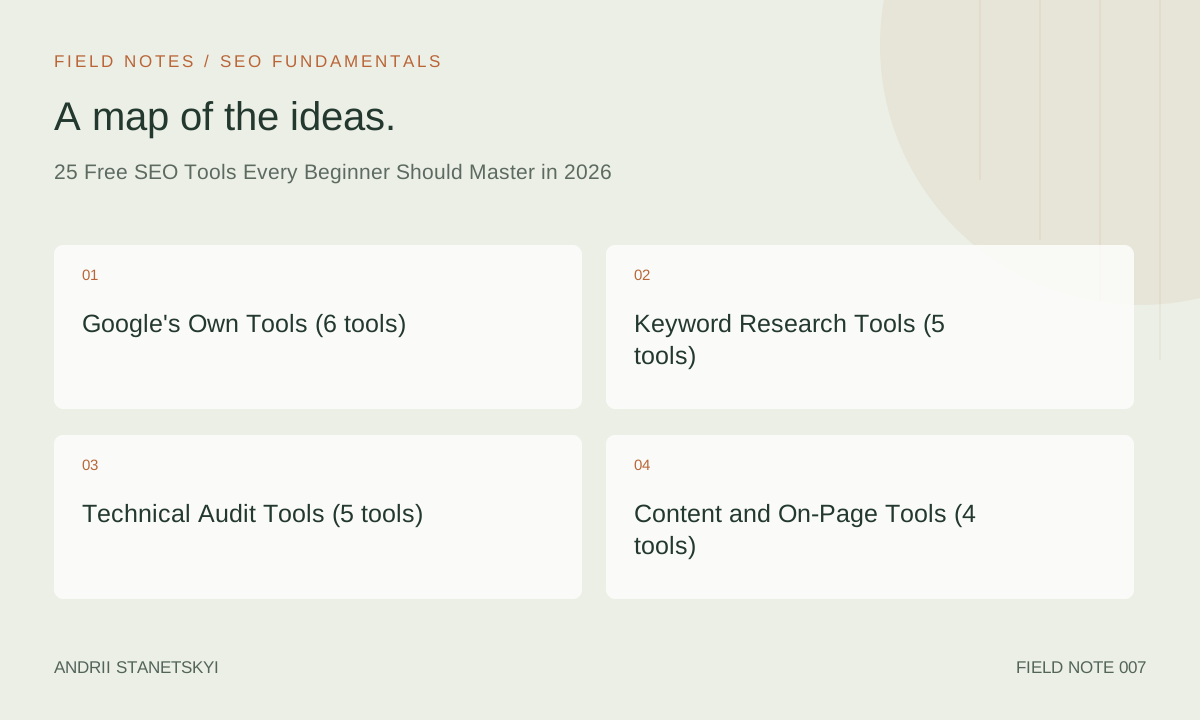
The SEO tool market is dominated by $100–$500/month platforms that are overkill for most beginners and unnecessary for many specific tasks. This list covers the 25 free tools that collectively do 80% of what paid tools do — with notes on exactly what each tool is for, what it can't do, and when you'll need to upgrade. Tools are grouped by function: research, technical audit, content, link analysis, and monitoring.
One constraint up front: "free" sometimes means "free tier with meaningful limits" rather than "completely unlimited." Where limits matter, I'll call them out. A tool that's free but limited to 10 queries per day is still useful — you just need to know the limit before you build a workflow around it.
Google's Own Tools (6 tools)
1. Google Search Console (GSC)
The single most important free tool in SEO. Provided by Google, it shows you exactly how Google sees your site: which pages are indexed, which queries you're ranking for, your click-through rates and average positions, Core Web Vitals from real users, mobile usability issues, and any manual actions or security problems. No third-party tool provides this data — it comes directly from Google's systems.
Setup: Verify your property at search.google.com/search-console. Submit your sitemap. Check weekly. Limitation: Data is delayed 2–3 days and query data is limited to 16 months of history.
2. Google Analytics 4 (GA4)
GA4 is your traffic and conversion measurement platform. Link it to GSC for combined organic traffic + conversion data. In GA4, segment traffic by channel → Organic Search to see sessions, bounce rate, conversions, and revenue attributable to SEO. The key report for SEO: Acquisition → Traffic Acquisition → Organic Google. Limitation: GA4's sampling on high-traffic sites in the free tier can affect report accuracy; BigQuery export is available for more precise analysis.
3. Google PageSpeed Insights
Runs a Lighthouse audit against any URL and reports Core Web Vitals from both lab data (synthetic test) and field data (real user CrUX data). The most important tool for diagnosing LCP, INP, and CLS issues and getting specific recommendations. Access at pagespeed.web.dev. Limitation: Lab data represents one test condition, not actual user distributions across devices and networks.
4. Google Rich Results Test
Validates structured data markup on any page and shows which rich results (FAQ, Recipe, Review, etc.) your page is eligible for. Essential before deploying any Schema.org markup to production. Access at search.google.com/test/rich-results. Limitation: Validates eligibility only — Google may still not show rich results even if the markup is valid.
5. Google Trends
Shows relative search interest for queries over time. Invaluable for: identifying seasonal trends, comparing query variants, finding rising topics before competition heats up, and understanding regional interest differences. Underused for competitive intelligence — comparing your brand's search volume trend against competitors is a legitimate research technique. Limitation: Shows relative interest, not absolute search volumes.
6. Google's URL Inspection Tool (within GSC)
Tests any URL to show exactly how Googlebot crawls and renders it, including a screenshot of the rendered page, the HTTP response code, discovery date, and indexing status. Essential for debugging why specific pages aren't indexed or rendering correctly. Available inside GSC → URL Inspection. Limitation: Tests one URL at a time; no bulk testing in the free tier.
Keyword Research Tools (5 tools)
7. Ahrefs Webmaster Tools (Free Tier)
The free tier of Ahrefs, available when you verify ownership of your site. Provides: backlink data for your verified properties, organic keyword rankings, broken link reports, and site audit (up to 5,000 pages per crawl). The backlink data is some of the most comprehensive available — the free tier is genuinely useful, not just a teaser. Limitation: Only works for sites you've verified ownership of. No competitor data on the free tier.
8. Semrush Free Account (10 queries/day)
Semrush's free tier allows 10 searches per day across their keyword, domain, and backlink tools. Enough for daily spot-checks: verifying keyword difficulty for a handful of target terms, checking a competitor's top keywords, or looking up a site's authority score. Their Keyword Magic Tool free tier includes keyword difficulty scores and search volume estimates. Limitation: 10 queries/day is tight for systematic research. Supplement with other tools.
9. Google Keyword Planner
Google Ads' built-in keyword research tool is free with a Google Ads account (even without running ads). Shows search volume ranges, keyword ideas, and competition level (for ads, not organic — though these correlate). Requires a Google Ads account. Limitation: Shows volume ranges ("1K–10K") rather than precise numbers unless you're spending on ads. Better for idea generation than precise volume estimation.
10. AnswerThePublic (Free Tier)
Visualizes questions, prepositions, and comparisons that users search around any seed keyword. Excellent for finding question-format keywords for FAQ sections, "People Also Ask" targeting, and understanding the informational needs around a topic. The free tier allows 3 searches per day. Limitation: No search volume data; purely a keyword ideation tool.
11. AlsoAsked
Crawls Google's People Also Ask (PAA) boxes to map out the relationship between questions around a topic. Invaluable for structuring FAQ sections and understanding what follow-up questions a topic generates. Free tier: 3 searches per day. Limitation: No volume data; the value is in understanding question relationships, not prioritizing by traffic potential.
Technical Audit Tools (5 tools)
12. Screaming Frog SEO Spider (Free Tier)
The industry-standard desktop crawler. The free version crawls up to 500 URLs and reports on title tags, meta descriptions, response codes, redirect chains, canonical tags, hreflang attributes, structured data, and dozens of other technical signals. For sites under 500 pages, the free version is all you need for a comprehensive audit. For larger sites, the paid version is £259/year. Limitation: 500 URL crawl limit on free tier. No JavaScript rendering in free tier (paid version includes Headless Chrome rendering).
13. Sitebulb Free Trial
Sitebulb offers a better visualization layer than Screaming Frog, with priority-ordered recommendations and visual site architecture maps. Free 14-day trial; paid plans start at £13.50/month. Worth using the trial period to audit a site systematically. Note: This is a trial, not a permanently free tool — included because the trial period is long enough to complete a meaningful audit.
14. Lighthouse (Chrome DevTools)
Built into Chrome (open DevTools → Lighthouse tab), Lighthouse runs a local audit covering Performance, Accessibility, Best Practices, and SEO. Scores each category 0–100 and provides specific, actionable recommendations. Equivalent to PageSpeed Insights lab data but running locally (useful for authenticated pages, staging environments, or pages behind paywalls). Free, no account needed. Limitation: Lab data only; no field data without connecting to PageSpeed Insights or CrUX.
15. Chrome DevTools (Network, Coverage, Performance tabs)
Chrome's built-in developer tools provide render performance waterfall charts, unused JavaScript/CSS identification, and HTTP response header inspection. The Network tab is essential for diagnosing render-blocking resources and identifying third-party scripts causing performance issues. Free with every Chrome install. Limitation: Requires some technical literacy to interpret. The Performance tab especially has a steep learning curve.
16. Redirect Path Chrome Extension
A free Chrome extension that displays the redirect chain for any URL in the address bar, including HTTP status codes at each step. The fastest tool for diagnosing redirect issues on individual URLs. Shows 301, 302, 404, and other codes instantly. Limitation: One URL at a time; not suitable for bulk redirect auditing (use Screaming Frog for that).
Content and On-Page Tools (4 tools)
17. Detailed SEO Extension (Chrome)
A free Chrome extension that overlays SEO data on any page you visit: title tag, meta description, H1–H6 structure, canonical tag, robots meta tag, schema markup present, internal and external link counts. Faster than view-source for on-page diagnostics. Free with no limits. Limitation: Single-page inspection only; no bulk capabilities.
18. Hemingway Editor (Free Web Version)
Not an SEO tool in the traditional sense, but readability is an SEO factor (Google's quality raters explicitly evaluate reading level and clarity). Hemingway Editor grades reading level, flags passive voice, and highlights overly complex sentences. The free web version at hemingwayapp.com requires no account. Use it on key pages where clarity directly affects conversion and engagement. Limitation: Writing aid only; no SEO-specific analysis.
19. Yoast SEO (Free WordPress Plugin)
For WordPress sites, Yoast SEO's free plugin handles: XML sitemap generation, title and meta description templates, canonical tag management, robots.txt editing via UI, breadcrumb schema, and basic on-page content analysis. It's not perfect (the "readability" score is simplistic and the green light system encourages gaming over genuine quality), but it solves real technical setup problems for beginners. Limitation: WordPress only. Paid features include redirect manager, internal link suggestions, and multiple focus keyphrases.
20. Rank Math (Free WordPress Plugin)
A strong alternative to Yoast with a more generous free tier: 5 focus keywords per post (vs Yoast's 1), built-in schema markup builder, 404 monitoring, and redirect manager — all in the free version. The UI is more modern, and the schema builder is substantially more capable than Yoast's free tier. Limitation: WordPress only.
Link Analysis Tools (3 tools)
21. Ahrefs Backlink Checker (Free, Limited)
Ahrefs' free backlink checker (at ahrefs.com/backlink-checker) shows the top 100 backlinks for any domain, the Domain Rating (DR), and the total referring domain count. Useful for quick competitor link profiling or sanity-checking a target site's authority before outreach. No account required. Limitation: Top 100 links only; no historical data; no full link profile on free version.
22. Moz Link Explorer (Free Tier)
Moz's Link Explorer free tier provides 10 queries per month, showing Domain Authority (DA), top linking domains, and spam score for any domain or URL. Useful for a monthly check-in on your own domain's authority growth and a quick competitive benchmark. Limitation: 10 queries/month is very limited. Use strategically rather than for regular research.
23. Google Search (link: operator and site: operator)
Google's own search operators provide crude but fast link and index data. site:domain.com shows indexed pages (not exhaustive). link:domain.com is deprecated and no longer reliable for full backlink analysis, but branded link searches (searching your brand name and filtering for external mentions) can surface recent PR coverage and link opportunities. Free, always available. Limitation: Not a substitute for a proper link analysis tool.
Monitoring and Reporting Tools (2 tools)
24. Google Data Studio / Looker Studio
Google's free dashboarding tool connects to GA4, GSC, Google Ads, and dozens of other data sources. Build reusable SEO reporting dashboards that pull live data from GSC and GA4 into visual reports. The GSC connector is particularly useful — it makes it easier to spot trends and anomalies than the native GSC interface. Free with a Google account, no usage limits for basic connectors. Limitation: Setup requires some configuration; not plug-and-play.
25. Bing Webmaster Tools
Bing's equivalent of GSC — often overlooked because Google dominates search, but Bing has 6–8% of U.S. desktop search market share and significantly more through Microsoft integrations (Cortana, Edge, Windows search). Bing Webmaster Tools provides keyword data, site scan reports, and backlink data. The site scan is particularly useful for finding basic technical issues that also affect Google rankings. Free at bing.com/webmasters. Limitation: Bing's data is Bing-specific; not a substitute for GSC for Google-focused SEO.
Tool Comparison: Free vs Paid Capabilities
| Task | Best Free Option | When to Upgrade to Paid |
|---|---|---|
| Indexation monitoring | Google Search Console | Never — GSC is the authoritative source |
| Keyword research | Google Keyword Planner + AnswerThePublic | When you need precise volumes + competitor gap analysis |
| Technical site audit | Screaming Frog (≤500 URLs) | When your site exceeds 500 pages (£259/year) |
| Core Web Vitals | PageSpeed Insights + GSC | Never for the basics; CrUX data is free |
| Backlink analysis | Ahrefs Webmaster Tools (own site) | When you need competitor backlink profiles |
| Rank tracking | GSC Search Performance | When you need daily tracking for 100+ keywords |
| Competitor research | Semrush free (10 queries/day) | When you need systematic competitive intelligence |
| Structured data validation | Google Rich Results Test | Never — this is the authoritative validator |
FAQ
Do I need to pay for SEO tools to be effective?
No, especially for a site under 500 pages that's just starting out. Google Search Console, Screaming Frog (free tier), Google Analytics 4, and PageSpeed Insights collectively cover the most critical SEO workflows. You'll hit walls eventually — particularly for competitor research and rank tracking at scale — but you can do serious SEO work for months on free tools alone.
What's the most important free SEO tool?
Google Search Console, without competition. It's the only tool that gives you direct data from Google about your site's performance in their index. No amount of third-party tooling substitutes for it.
Is Screaming Frog actually free?
Yes — Screaming Frog SEO Spider is free for crawls up to 500 URLs, with no expiration date and no account required. The paid version (£259/year) removes the URL limit, adds JavaScript rendering, and includes scheduling and additional integrations. For sites over 500 pages, the paid version is worth it.
Why aren't Ahrefs or Semrush on this list?
The paid versions of Ahrefs ($129+/month) and Semrush ($139+/month) are powerful but genuinely beyond the free tier covered in this article. Ahrefs Webmaster Tools (free, own-site only) is included at #7. Semrush's 10-query free tier is included at #8. The full paid platforms are mentioned in the upgrade threshold table so you know when the investment makes sense.
Which tools do I install first?
In order of priority: (1) Google Search Console, (2) Google Analytics 4, (3) Screaming Frog SEO Spider, (4) Lighthouse or PageSpeed Insights, (5) Yoast or Rank Math if using WordPress. This sequence gives you a baseline view of your site's SEO health and the data infrastructure to measure improvements.
Are browser extensions safe for SEO use?
Extensions like Detailed SEO and Redirect Path are from reputable developers and widely used by the SEO community. As with any browser extension, review permissions before installing. Avoid installing extensions that request access to all website data unless they have clear, documented reasons for that access level. Stick to extensions with large user bases and active maintenance.
Key Takeaways
- Google Search Console is free, authoritative, and non-replaceable — install it first, check it weekly.
- Screaming Frog's free tier (500 URLs) covers comprehensive technical auditing for most small business sites.
- PageSpeed Insights and Google's Rich Results Test are the authoritative tools for their specific functions — free alternatives exist but these come from Google itself.
- Keyword research with free tools is viable using a combination of Google Keyword Planner, AnswerThePublic, and Semrush's free 10-query tier.
- Ahrefs Webmaster Tools (free, own-site) is the best free option for backlink analysis of your own domain.
- Upgrade to paid tools when: your site exceeds 500 pages (Screaming Frog), you need competitor keyword/backlink data (Ahrefs/Semrush), or you need daily rank tracking at scale.
- Looker Studio (free) turns GSC and GA4 data into shareable, visual dashboards — worth setting up for ongoing monitoring.
Conclusion
The 25 tools in this list cover every major SEO workflow a beginner needs to handle: technical auditing, keyword research, on-page optimization, link analysis, content quality, and performance monitoring. You'll eventually hit the limits of free tools — particularly for competitor research and large-scale crawling — but that point is further away than most beginners think. Install GSC and GA4 today, run a Screaming Frog crawl this week, and build a systematic workflow around the free tools before committing to paid subscriptions. The data will tell you when you've outgrown them.