Some technical SEO issues fail loudly: a misconfigured robots.txt blocks the entire site, a server throws 500s, a sitemap breaks. Those get noticed and fixed. The insidious issues are the ones that fail silently — soft 404s that look like content pages to humans but confuse Google, redirect chains that slowly drain crawl budget over years, and orphaned canonical tags pointing to URLs that no longer exist. These are the time bombs: they accumulate undetected, and by the time they show up in metrics, the damage has compounded.
This guide covers each failure mode with real diagnostic patterns and concrete remediation steps.
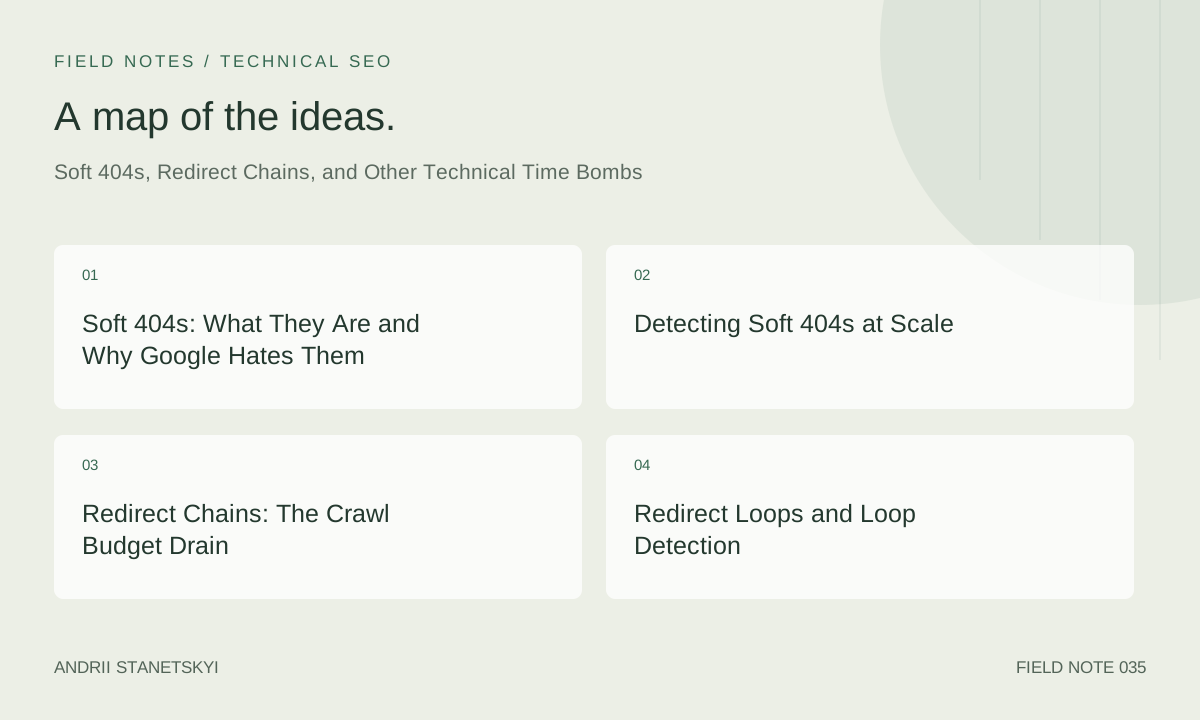
Soft 404s: What They Are and Why Google Hates Them
A soft 404 is a page that returns an HTTP 200 status code but serves "not found" or empty content. The server says "here's a page," but there's nothing meaningful there. Classic examples:
- A product that's been discontinued — the page now shows "Product unavailable" but still returns 200.
- A CMS template that renders with no data — a blog category with zero posts that shows an empty grid.
- A search results page with no results ("No items found for your search") returning 200.
- A user profile page for a deleted account that returns "User not found" with a 200 status.
- A tag page with one expired post, rendering a mostly-empty page.
Google's John Mueller has confirmed that soft 404s are one of Google's most common reasons for URL exclusion. Google is increasingly good at detecting them using signals like: short word count relative to template chrome, presence of "no results" or "not found" patterns in the content, low time-on-site signals (if Googlebot has rendering data), and comparison against other pages in the same template.
Why They're Worse Than Hard 404s
A hard 404 (proper HTTP 404 or 410 response code) tells Google: "this URL is gone, stop crawling it, remove it from the index." Google honors this relatively quickly. A soft 404 sends the signal: "this URL exists, please come back." Googlebot keeps crawling it, it stays in the index with degraded ranking signals, and it consumes crawl budget. It's a zombie page — not dead, not alive, just consuming resources.
Detecting Soft 404s at Scale
GSC Coverage Report
GSC's Coverage report has a dedicated "Excluded: Soft 404" category. This is your first stop. Export the list and prioritize by: pages that were previously indexed (meaning Google actively degraded them) and pages that should still have content (indicating a data/CMS problem).
Screaming Frog Detection
In Screaming Frog, set up custom search (Configuration → Custom → Search) to match text patterns that indicate empty or not-found content:
# Custom Screaming Frog search patterns for soft 404 detection
# Add as "Does Not Contain" checks on 200-response pages:

Pattern 1: "no results found"
Pattern 2: "product unavailable"
Pattern 3: "page not found"
Pattern 4: "no items match"
Pattern 5: "0 products"
Pattern 6: "sorry, we couldn't find"
Pattern 7: "this item is no longer available"
Also use the "Word Count" filter: pages returning 200 with fewer than 100 words are high candidates for soft 404s when your average page has 500+.
Log File Detection
# Find URLs Googlebot crawled frequently that are in GSC as "Soft 404"
# Step 1: Get Googlebot crawl data
grep "Googlebot" /var/log/nginx/access.log | awk '{print $7, $9}' \
  | grep " 200$" | awk '{print $1}' | sort | uniq -c | sort -rn > crawled-200s.txt

# Step 2: Cross-reference with GSC soft 404 export (saved as soft-404-list.txt)
comm -12 <(sort crawled-200s.txt | awk '{print $2}') <(sort soft-404-list.txt)
Programmatic Detection via Content Analysis
#!/usr/bin/env python3
"""
Soft 404 detector: crawls URLs and flags likely soft 404s
based on word count and pattern matching
"""
import requests
from bs4 import BeautifulSoup
import re

SOFT_404_PATTERNS = [
    r'no results? found',
    r'not? found',
    r'unavailable',
    r'0 products?',
    r'no items?',
    r'sorry.{0,30}couldn\'t find',
    r'page does not exist',
]

def is_soft_404(url):
    resp = requests.get(url, timeout=10, headers={'User-Agent': 'SEOAuditor/1.0'})
    if resp.status_code != 200:
        return False, resp.status_code

    soup = BeautifulSoup(resp.text, 'html.parser')
    # Remove nav, header, footer, scripts
    for tag in soup(['nav', 'header', 'footer', 'script', 'style']):
        tag.decompose()

    body_text = soup.get_text(separator=' ', strip=True)
    word_count = len(body_text.split())

    for pattern in SOFT_404_PATTERNS:
        if re.search(pattern, body_text, re.IGNORECASE):
            return True, f"Pattern match: {pattern}"

    if word_count < 150:
        return True, f"Low word count: {word_count}"

    return False, f"OK ({word_count} words)"

# Usage
urls = open('candidate-urls.txt').read().splitlines()
for url in urls:
    is_s404, reason = is_soft_404(url)
    if is_s404:
        print(f"SOFT-404: {url} | {reason}")
Fixing Soft 404s
The correct fix depends on the underlying cause:
| Soft 404 Scenario | Correct Fix | Priority |
|---|---|---|
| Discontinued product, no replacement | Return HTTP 404 or 410 (Gone) | High |
| Discontinued product, replacement exists | 301 redirect to replacement or category | High |
| Empty category / tag page | noindex the page, or 404 if permanently empty | Medium |
| Search results page with no results | noindex all search result pages via robots meta | High |
| User/profile page for deleted account | Return HTTP 404 | Medium |
| Thin content page that got published by mistake | Improve content quality or 301 to relevant page | Medium |
| Expired event/sale page | Update content OR 301 to relevant landing page | Medium |
Redirect Chains: The Crawl Budget Drain
A redirect chain occurs when URL A redirects to URL B, which redirects to URL C. Each hop in the chain costs a separate HTTP request, delays crawling, and dilutes the link equity transfer.
Google's official guidance is that it follows redirect chains up to 10 hops. In practice, Googlebot often stops following chains at 3–5 hops if it has seen the chain before and learned the final destination. But even "only" 3 hops is a problem at scale.
How Chains Accumulate
A site migrated from HTTP to HTTPS in 2019: HTTP → HTTPS (301). Same site migrated from non-www to www in 2021: adding another hop for non-www HTTP URLs. Same site launched new URL structure in 2023: old slugs redirect to new slugs. Now some old URLs have: http://example.com/old-product → https://example.com/old-product → https://www.example.com/old-product → https://www.example.com/products/new-slug. Four hops.
# Check a URL for redirect chain length using curl
curl -L -I -o /dev/null -w "Final URL: %{url_effective}\nRedirects: %{num_redirects}\nTotal time: %{time_total}\n" \
  http://example.com/old-product-url

# Bulk check a list of URLs
while read url; do
  hops=$(curl -s -L -I -o /dev/null -w "%{num_redirects}" "$url")
  if [ "$hops" -gt 1 ]; then
    final=$(curl -s -L -I -o /dev/null -w "%{url_effective}" "$url")
    echo "CHAIN ($hops hops): $url -> $final"
  fi
done < urls-to-check.txt
Diagnosing with Screaming Frog
In Screaming Frog: Reports → Redirect Chains. This shows all chain members, chain length, and final destination. Sort by chain length descending. Any chain of 3+ hops needs immediate attention. Any chain that ends at a 404 is a broken redirect — link equity is being sent to a dead end.
Fixing Redirect Chains
The fix is simple in principle: update every redirect in a chain to point directly to the final canonical URL. On Apache/.htaccess:
# Before: 3-hop chain
# /old-url → /interim-url → /newer-url → /final-url

# After: collapse to direct redirect
Redirect 301 /old-url https://www.example.com/final-url
Redirect 301 /interim-url https://www.example.com/final-url
Redirect 301 /newer-url https://www.example.com/final-url
On Nginx:
# Nginx: Collapse redirect chains
server {
    # Redirect all old URL variants directly to canonical
    rewrite ^/old-url$ https://www.example.com/final-url permanent;
    rewrite ^/interim-url$ https://www.example.com/final-url permanent;
    rewrite ^/newer-url$ https://www.example.com/final-url permanent;
}
On sites with thousands of redirect rules, use a mapping file approach in Nginx:
# nginx.conf
map $uri $redirect_uri {
    include /etc/nginx/redirect-map.conf;
}

server {
    if ($redirect_uri) {
        return 301 $redirect_uri;
    }
}

# /etc/nginx/redirect-map.conf (generated from database/spreadsheet)
/old-product-1    https://www.example.com/new-product-1;
/old-product-2    https://www.example.com/new-product-2;
/old-category     https://www.example.com/new-category;
Redirect Loops and Loop Detection
A redirect loop is a chain that references itself: A → B → A. They typically happen from misconfigured rewrite rules, CMS bugs, or protocol/www redirect rules that conflict.
# Detect loops: curl stops at 30 redirects by default, report if it exceeds that
curl -L --max-redirs 30 -I -o /dev/null -w "%{num_redirects}" "$URL" 2>&1 \
  | grep -q "30" && echo "POSSIBLE LOOP: $URL"

# Python loop detection with visited set
import requests

def check_loop(start_url, max_hops=20):
    visited = set()
    url = start_url
    for i in range(max_hops):
        resp = requests.head(url, allow_redirects=False, timeout=5)
        if resp.status_code not in (301, 302, 307, 308):
            return False, url, i
        next_url = resp.headers.get('Location', '')
        if next_url in visited:
            return True, next_url, i
        visited.add(url)
        url = next_url
    return True, url, max_hops  # Exceeded max hops = probable loop

loop, final, hops = check_loop("https://www.example.com/suspect-url")
print(f"Loop: {loop}, Final: {final}, Hops: {hops}")
Other Technical Time Bombs
Canonical Tag Chains
A canonical tag pointing to a URL that itself has a canonical tag. Google follows canonical chains up to 3 hops, but treats the final URL as the canonical — which may not be what you intended. Also: a canonical pointing to a 404 page. Google ignores invalid canonicals, treating the source URL as its own canonical.
<!-- URL: /products/shoe-v1 -->
<link rel="canonical" href="/products/shoe-v2">

<!-- URL: /products/shoe-v2 (this page also has a canonical) -->
<link rel="canonical" href="/products/shoe-v3">

<!-- Result: Google may or may not follow this chain correctly -->
<!-- Fix: update /products/shoe-v1 to point directly to /products/shoe-v3 -->
Mixed Signals: Canonical + noindex
A page with a canonical pointing to URL B, and also a noindex directive. These conflict: canonical says "attribute equity to URL B," noindex says "don't index or follow anything here." Google will honor the noindex and not index the page, but may not pass authority through the conflicting canonical. Always resolve the intent: either the page should exist (remove noindex, keep canonical) or it shouldn't (remove canonical, keep noindex and add a proper 404 or 410).
Hreflang Pointing to Non-Canonical URLs
hreflang attributes pointing to redirect targets instead of canonical URLs. Every hreflang URL must be canonicalized, crawlable, and indexable. A hreflang pointing to a 301 redirect is invalid — Google won't process it reliably.
<!-- WRONG: hreflang pointing to a URL that redirects -->
<link rel="alternate" hreflang="de" href="https://www.example.com/de/old-path">

<!-- CORRECT: hreflang pointing to the canonical destination -->
<link rel="alternate" hreflang="de" href="https://www.example.com/de/correct-path">
Sitemap Pointing to Soft 404s
When a product is discontinued and goes soft 404, if the sitemap still references it, Googlebot will keep crawling it. The sitemap re-invitation overrides Google's tendency to deprioritize empty pages. Automate sitemap exclusion when a page is marked as discontinued in your CMS.
Internal Links to 404 Pages
Pages that have been deleted but are still linked from other pages. The link equity is lost and crawl budget is wasted. Find them:
# Find internal 404s in Screaming Frog
# Filter: Response Codes → Client Error (4xx)
# Then: Inlinks tab for each 404 URL shows all source pages

# Command-line approach: check all internal links for 404s
#!/bin/bash
BASE="https://www.example.com"
# Assumes you have a list of all internal URLs in sitemap.txt
while read url; do
  status=$(curl -s -o /dev/null -w "%{http_code}" "$url")
  if [ "$status" -eq 404 ]; then
    echo "404: $url"
  fi
done < sitemap-urls.txt
Remediation Decision Matrix
| Issue Found | Has Replacement? | Has Inbound Links? | Recommended Action |
|---|---|---|---|
| Soft 404 | Yes | Yes | 301 to replacement |
| Soft 404 | Yes | No | 301 to replacement (simplify site) |
| Soft 404 | No | Yes | Return 410 + update inbound links |
| Soft 404 | No | No | Return 410 |
| Redirect chain (2 hops) | — | — | Collapse to direct 301 if easy; tolerate if complex migration |
| Redirect chain (3+ hops) | — | — | Collapse to direct 301 immediately |
| Redirect loop | — | — | Fix rewrite rules immediately; highest priority |
| Canonical chain | — | — | Update source canonical to final destination |
| Canonical → 404 | — | — | Update canonical to valid URL or remove |
| Internal links to 404 | Yes | — | Update internal links to replacement |
| Internal links to 404 | No | — | Remove internal links; return 410 |
FAQ
How quickly does Google remove soft 404s from the index after I fix them?
Faster than you'd expect if you fix them correctly. Returning a proper 404 or 410 status code causes Google to remove pages from the index typically within 1–2 crawl cycles, which can be days to weeks depending on crawl frequency. Returning a 410 (Gone) signals permanence and can accelerate removal versus 404. After returning the correct status, request removal via GSC's URL Removal tool for pages that need urgent deindexing.
Does a redirect chain hurt SEO even if the final destination returns 200?
Yes. Each hop dilutes link equity transfer (Google has stated that some equity is lost with each redirect). Each hop adds a Googlebot request. Chains in sitemaps confuse Google's URL normalization. The final destination may rank lower than if it received direct inbound links without the chain.
Is 302 redirect vs 301 redirect a big deal?
For permanent moves, yes. A 302 (temporary redirect) signals to Google that the original URL should remain in the index — the move is temporary. If you're permanently moving content, use 301 (or 308 for POST-preserving scenarios). Using 302 for permanent moves means the original URL stays indexed, duplicate content accumulates, and link equity doesn't transfer properly. Always match the redirect status code to your actual intent.
What's a 410 Gone vs. 404 Not Found — when to use each?
410 is semantically stronger: "this resource existed and is permanently gone." 404 is "not found" which could be temporary or permanent. For discontinued products, expired events, and deleted content, use 410. Google processes 410s faster and is less likely to re-crawl to check if the content reappeared. For genuinely uncertain cases (you might bring the page back), use 404.
I have 50,000 soft 404s. Where do I start?
Prioritize by: (1) pages that still have inbound links — fix these first to recover link equity; (2) pages that were previously indexed and ranking — recovering these has direct traffic impact; (3) pages that Googlebot visits most frequently per your logs — these waste the most crawl budget. Pages with no inbound links, never indexed, and rarely crawled can be batch-processed last.
Key Takeaways
- Soft 404s are worse than hard 404s for SEO: they keep Googlebot coming back, waste crawl budget, and keep zombie pages in the index with degraded quality signals.
- Return HTTP 410 for permanently deleted content — it's processed faster than 404 and signals definitiveness to crawlers.
- Redirect chains of 3+ hops should be collapsed immediately. Two hops (HTTP→HTTPS, non-www→www) is acceptable; three or more is not.
- Canonical chains and canonical→404 are subtle but real problems. Audit canonical tags as part of every technical SEO review.
- The remediation decision is: if replacement exists, 301 redirect; if no replacement and inbound links exist, 410 and fix those links; if no replacement and no links, just 410.
- Automate detection: run Screaming Frog or OnCrawl weekly on large sites. Don't rely on GSC to surface these issues — by the time they show up there, they've already affected rankings.
For the tools and workflows to identify these issues through log file analysis, see the log file analysis guide. For how canonical tags should be used correctly before they become part of a chain, see the canonical tags deep dive.